Trocar de Community para Enterprise
Dependendo da sua instalação atual, há diversas maneiras de fazer upgrade da versão Community. De qualquer forma, as diretrizes básicas são:
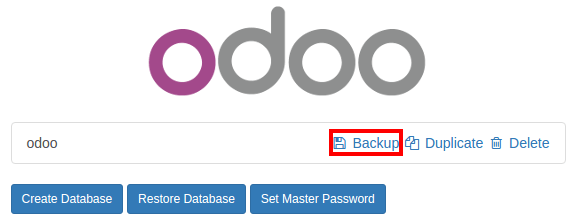
Backup your community database
Shutdown your server
Install the web_enterprise module
Restart your server
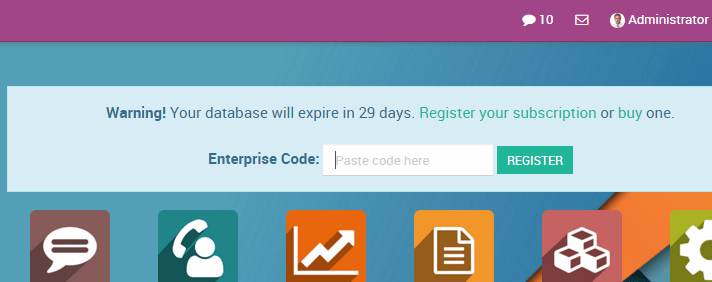
Enter your Odoo Enterprise Subscription code
No Linux, usando um instalador
Backup your community database
Stop the odoo service
$ sudo service odoo stopInstall the enterprise .deb (it should install over the community package)
$ sudo dpkg -i <path_to_enterprise_deb>Update your database to the enterprise packages using
$ python3 /usr/bin/odoo-bin -d <database_name> -i web_enterprise --stop-after-initYou should be able to connect to your Odoo Enterprise instance using your usual mean of identification. You can then link your database with your Odoo Enterprise Subscription by entering the code you received by e-mail in the form input
No Linux, usando o código-fonte
Há muitas maneiras de iniciar seu servidor ao usar códigos-fonte, e você provavelmente tem a sua favorita. Talvez seja necessário adaptar as seções ao seu fluxo de trabalho habitual.
Shutdown your server
Backup your community database
Update the --addons-path parameter of your launch command (see ../on_premise/source)
Install the web_enterprise module by using
$ -d <database_name> -i web_enterprise --stop-after-init
Dependendo do tamanho da sua base de dados, isso pode levar algum tempo.
Restart your server with the updated addons path of point 3. You should be able to connect to your instance. You can then link your database with your Odoo Enterprise Subscription by entering the code you received by e-mail in the form input
No Windows
Backup your community database
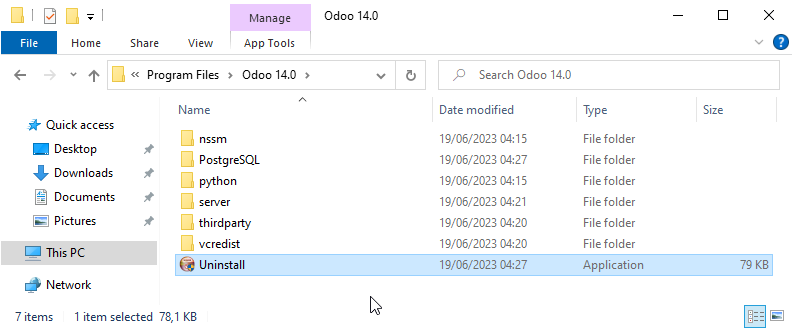
Uninstall Odoo Community (using the Uninstall executable in the installation folder) - PostgreSQL will remain installed
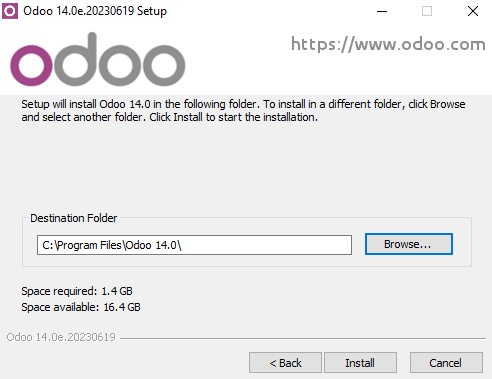
Launch the Odoo Enterprise Installer and follow the steps normally. When choosing the installation path, you can set the folder of the Community installation (this folder still contains the PostgreSQL installation). Uncheck Start Odoo at the end of the installation
Using a command window, update your Odoo Database using this command (from the Odoo installation path, in the server subfolder)
$ ..\python\python.exe odoo-bin -d <database_name> -i web_enterprise --stop-after-initNo need to manually launch the server, the service is running. You should be able to connect to your Odoo Enterprise instance using your usual mean of identification. You can then link your database with your Odoo Enterprise Subscription by entering the code you received by e-mail in the form input