Hong Kong
A localização de folha de pagamento de Hong Kong garante que todos os cálculos de salário estejam em conformidade estrita com os requisitos da Lei do Trabalho (Cap. 57) e Departamento de Receita Interna (IRD). Isso inclui cálculos automatizados para contribuições do Fundo de Previdência Obrigatória (MPF), geração de relatórios IR56 e processamento de pagamentos de licenças, como Pagamento em Lugar de Aviso Prévio, Pagamentos de Indenização (SP) e Pagamentos de Longo Serviço (LSP)—totalmente atualizados para as regras de transição de compensação de MPF de 2025.
Aplicativos e módulos
Instale <general/install> os seguintes módulos para obter todos os recursos da localização de folha de pagamento de Hong Kong:
Name |
Technical name |
Description |
|---|---|---|
Hong Kong - Accounting |
l10n_hk |
The base module to manage the chart of accounts and localization for Hong Kong. |
Hong Kong - Payroll |
l10n_hk_hr_payroll |
Enables payroll specific localization features for the Odoo Payroll app. This module also installs Hong Kong - Payroll with Accounting and Documents - Hong Kong Payroll. |
Hong Kong - Payroll with Accounting |
l10n_hk_hr_payroll_account |
Installs the link between Hong Kong payroll and accounting. |
Hong Kong - Payroll eMPF |
l10n_hk_hr_payroll_empf |
Enables the eMPF module to process eMPF contributions and reports. |
Documents - Hong Kong Payroll |
documents_l10n_hk_hr_payroll |
Integrates employee IR56 forms in the Odoo Documents app. |
Configurações gerais
O Odoo suporta gerenciamento multiempresa. Primeiro, a empresa deve ser configurada. Navegue até . Crie uma nova empresa ou selecione uma existente e configure os seguintes campos:
Company Name: Enter the business name in this field.
Address: Complete the full address, including the City, State, Zip Code, and Country.
Currency: By default, HKD is selected. If not, select HKD from the drop-down menu.
Phone: Enter the company phone number.
Email: Enter the email used for general contact information.
Configuração da folha de pagamento
Várias seções no menu de configuração (Configurações, Estruturas e Regras Salariais, Tipos de Entrada de Trabalho, Cronograma de Trabalho, Esquema MPF) definem regras de localização específicas para Hong Kong.
Definições
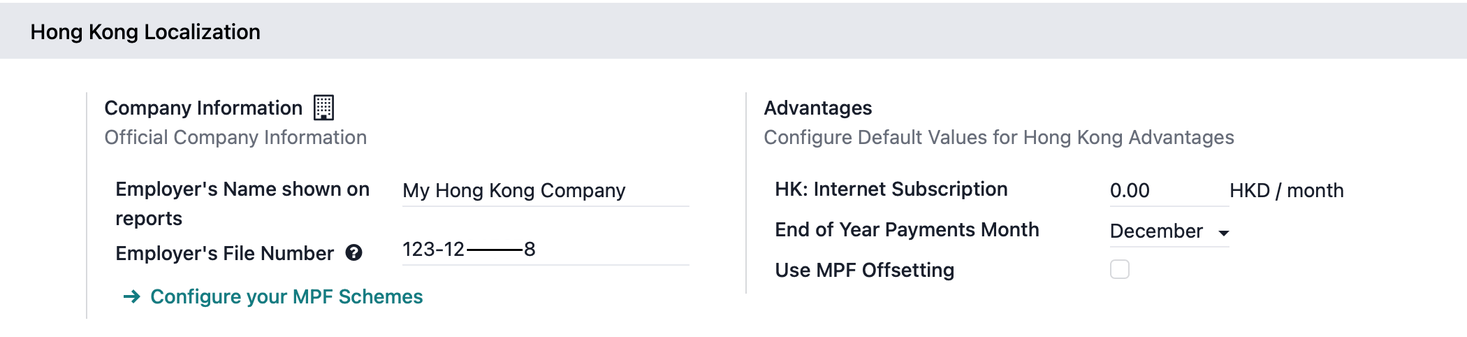
Vantagens
HK: Internet Subscription: Add a default monthly internet allowance.
End of Year Payments Month: Select the month to automatically add end-of-year payments to payslips (if any).
Use MPF Offsetting: Enable this to define pre-set and post-set offset periods for calculating Severance Payments (SP) and Long Service Payments (LSP).
Seção Contabilidade
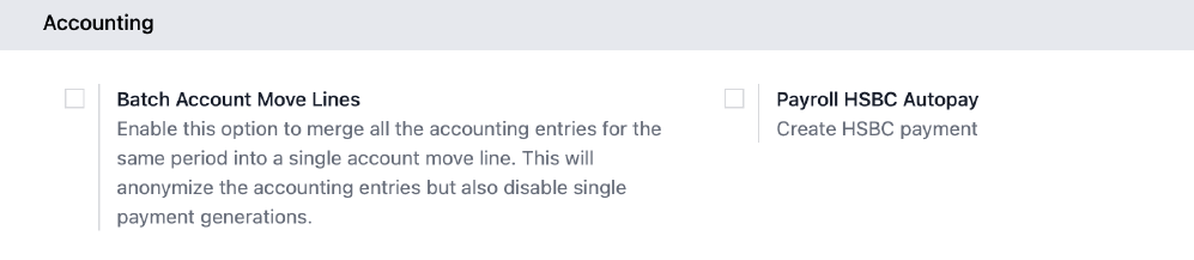
Configure as entradas para a seção Contabilidade:
Payroll HSBC Autopay: Enable to create HSBC payment files.
Batch Account Move Lines: Enable to merge all accounting entries for the same period into a single account move line. This anonymizes accounting entries but disables single payment generations.
Estruturas e regras
Navegue para para verificar regras salariais ou configurar regras salariais específicas da empresa.
CAP57: Pagamento Mensal de Funcionários
O Odoo fornece a estrutura salarial CAP57: Pagamento Mensal de Funcionários para calcular a folha de pagamento compatível para funcionários regulares. As seguintes regras salariais são obrigatórias, que são adicionadas automaticamente aos contracheques:
Rent Allowance: Amount derived from the employee's active rental record.
Basic Salary: Amount of base salary provided (after rent allowance deduction).
713 Gross: Net payable amount considering commissions, internet allowance, reimbursements, back-pay, deductions, etc.
MPF Gross: Net payable amount from 713 gross after consideration of additional allowances, deductions, and end-of-year payment.
Employee Mandatory Contribution: Mandatory employee MPF contribution.
Employer Mandatory Contribution: Mandatory employer MPF contribution.
Employee Voluntary Contribution: Voluntary employee contribution (if any).
Employer Voluntary Contribution: Voluntary employer contribution (if any).
Employer Voluntary Contribution 2: Additional voluntary employer contribution (if any).
Gross: Net payable amount from MPF gross after consideration of MPF deductions.
Net Salary: Final payable amount to be paid to the employee.
As seguintes regras salariais são regras opcionais para benefícios de funcionários, que podem ser adicionadas manualmente como entradas salariais no contracheque sob a aba Entradas Salariais:
Back Pay: Additional salary payout can be included under this category.
Commission: The commission earned during the period can be manually entered.
Global Deduction: A lump-sum deduction from the entire payslip.
Global Reimbursement: A lump-sum reimbursement to the entire payslip.
Referral Fee: The additional bonus offered for any form of business-related referral.
Moving Daily Wage: To override the ADW value used for leave computation.
Skip Rent Allowance: If set, the rental allowance is excluded from the current payslip.
Custom Average Monthly Salary: To override the average monthly salary used for end-of-year payment (rule is only applicable to payslips generated in December).
CAP57: Pagamento em Lugar de Aviso Prévio
O Odoo fornece a estrutura salarial CAP57: Pagamento em Lugar de Aviso Prévio para processar um pagamento final a um funcionário no lugar de cumprir um período de aviso prévio exigido na rescisão.
Regra obrigatória para esta estrutura salarial que é adicionada automaticamente ao contracheque:
Payment in Lieu of Notice: This is the calculated amount paid to the employee corresponding to the unserved notice period.
Regra opcional para esta estrutura salarial que pode ser adicionada manualmente como uma entrada salarial no contracheque sob a aba Entradas Salariais:
Lieu of Notice Period (Months): Only applicable to the CAP57: Payment in Lieu of Notice salary structure. By default, the final payout is set to 1-month. Use the Count field under the salary inputs tab to set a different notice period duration.
CAP57: Pagamento por Tempo de Serviço (LSP)
O Odoo oferece a estrutura salarial CAP57: Pagamento por Tempo de Serviço para processar um funcionário cuja relação de emprego contínua com o empregador, sob contrato de trabalho, atinge 5 anos.
Regras obrigatórias para esta estrutura salarial que são adicionadas automaticamente ao contracheque:
Long Service Payment: The final calculated amount of long service payment paid to the employee (after applying offsets, if any).
Long Service Payment Pre Transition: The portion of the long service payment calculated based on the employment period before the transition date of the offsetting arrangement, where MPF contributions can still be used to offset the payment.
Long Service Payment Post Transition: The portion of the long service payment calculated based on the employment period on or after the transition date of the offsetting arrangement.
Ative Usar Compensação de MPF na seção de localização de Hong Kong para usar estas regras salariais de compensação:
Pre-transition Offset: The amount of MPF contribution (or benefits from an ORSO (Occupational Retirement Schemes Ordinance) scheme) that can be used to offset the pre-transition amount.
Post-transition Offset: The amount of MPF contribution (or benefits from an ORSO (Occupational Retirement Schemes Ordinance) scheme) that can be used to offset the post-transition amount.
CAP57: Pagamento de Indenização (SP)
O Odoo oferece a estrutura salarial CAP57: Pagamento de Indenização para processar um funcionário cuja relação de emprego contínua com o empregador, sob contrato de trabalho, atinge 2 anos.
Regras obrigatórias para esta estrutura salarial que são adicionadas automaticamente ao contracheque:
Severance Payment: The final calculated amount of severance payment paid to the employee (after applying offsets, if any).
Severance Payment Pre Transition: The portion of the severance payment calculated based on the employment period before the transition date of the offsetting arrangement, where MPF contributions can still be used to offset the payment.
Severance Payment Post Transition: The portion of the severance payment calculated based on the employment period on or after the transition date of the offsetting arrangement.
Ative Usar Compensação de MPF na seção de localização de Hong Kong para usar estas regras salariais de compensação:
Pre-transition Offset: The amount of MPF contribution (or benefits from an ORSO (Occupational Retirement Schemes Ordinance) scheme) that can be used to offset the pre-transition amount.
Post-transition Offset: The amount of MPF contribution (or benefits from an ORSO (Occupational Retirement Schemes Ordinance) scheme) that can be used to offset the post-transition amount.
Tipo de entrada de trabalho
Navegue até para verificar tipos de registro de trabalho ou configurar um novo tipo de registro de trabalho.
Ao definir cada tipo de registro de trabalho para Hong Kong, os empregadores podem definir:
Rate: The rate that is used to calculate for each leave (e.g., 80% for sick leave).
ADW Calculation: Enable this to calculate the employee's pay according to the Average Daily Wage (ADW) rules under Hong Kong employment regulations.
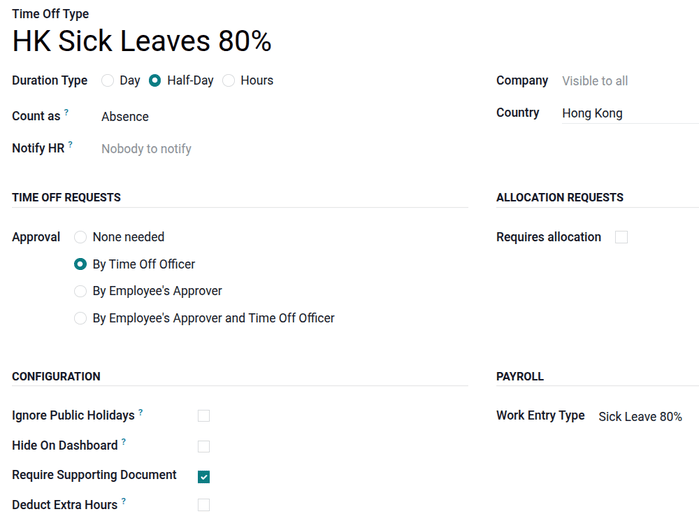
O Odoo suporta 11 tipos de registros de trabalho específicos de HK que são usados em conjunto com o aplicativo Ausências:
Sick Leave 80%: Paid sick leave compensated at 80% of the employee's average daily wage.
Compassionate Leave: Leave granted for personal emergencies, such as the death of a family member.
Marriage Leave: Time off granted to an employee for their wedding.
Examination Leave: Leave granted to an employee to take professional examinations.
Maternity Leave: Statutory leave granted to female employees for childbirth.
Maternity Leave 80%: Maternity leave compensated at 80% of the average daily wage.
Paternity Leave: Statutory leave granted to male employees following a child's birth.
Statutory Holiday: Mandatory public holidays recognized by Hong Kong employment law.
Public Holiday: General holidays observed by banks and businesses in Hong Kong.
Weekend: Standard non-working days for the employee.
Esquemas MPF
O Odoo permite múltiplas configurações de esquemas MPF (atualmente 24 esquemas), criação de novos esquemas, diferentes grupos MPF e classes de membros, e definição de renda para cálculos automatizados de MPF. Em alinhamento com os requisitos do eMPF, os relatórios de contribuição eMPF gerados pelo Odoo estão prontos para upload no portal eMPF.
Configurando um esquema eMPF
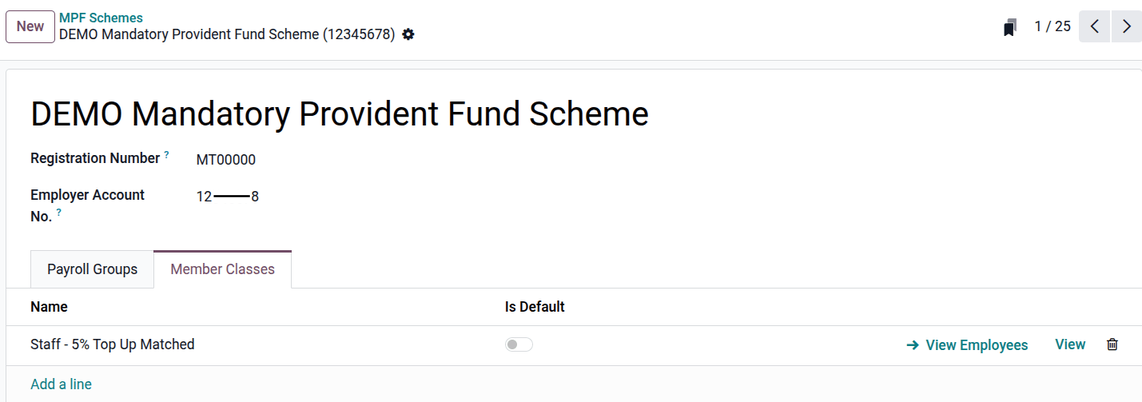
Siga estas etapas para configurar um esquema eMPF:
Click New or select an eMPF scheme to configure. Enter the Employer Account No. (this value is specific to the current company).
Click Add a line to create new payroll groups (used for mandatory contributions) and member classes (used for voluntary contributions).
Ao criar uma classe de membro, clique em Visualizar para configurar cada tipo de contribuição, opção, valor de renda e definição de renda.
Contribution Type: Select Employee's Voluntary Contribution, Employer's Voluntary Contribution, or Employer's Voluntary Contribution 2.
Option: Defines how much voluntary contribution is calculated.
Fixed Percentage of Income: Contribution according to a percentage.
Fixed Amount: Contribution according to a fixed amount.
Match Employee's Voluntary Contribution: Contribution matches the employee's voluntary contribution.
Fixed Percentage of Income minus Mandatory Contribution: Contribution capped with mandatory contribution.
Amount: Amount to apply as a percentage or fixed amount.
Definition of Income: Define which income is used to calculate voluntary contributions.
Relevant Wages: Based on all wages (commissions, bonuses, etc.) the employee receives after calculation.
Basic Wage: Based on the basic wage (wage on contract) the employee receives.
Configuração de funcionário
Para criar um registro de funcionário, navegue até . Clique em Novo no canto superior esquerdo. Preencha os detalhes de contato primários e configure as seguintes abas:
Aba Trabalho
Na aba Trabalho, configure informações organizacionais.
Work: Set department, job title, and manager.
Departure: Only visible after archiving an employee record.
Departure reason: Used in eMPF reports for termination payment checks.
Departure date: Used in IR56 forms.
Aba Personal
Na aba Pessoal, configure informações pessoais.
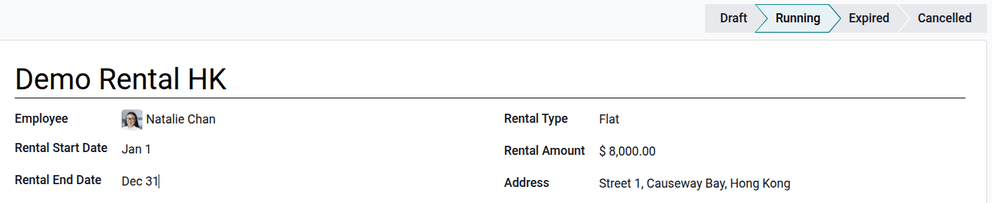
Private Contact: Set surname, given name, name in Chinese (if any), private email, phone number, and bank accounts.
Personal information: Set employee legal name, birth date, and gender.
Identification No: Set the HKID of the employee.
Location: Set Private Address.
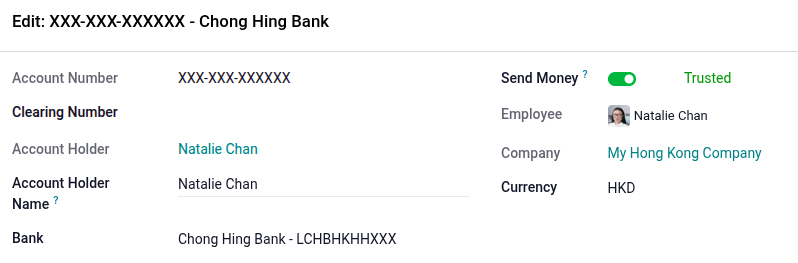
Aba Folha de Pagamento
Seção de visão geral do contrato
Contract: Select contract start and end dates for contract management.
Wage Type: Select Fixed Wage or Hourly Wage.
Wage: Define the employee's monthly wage.
Pay Category: Select CAP57: Hong Kong Employee for monthly Hong Kong payroll calculations. This defines when the employee is paid, their default working schedule, and the work entry type it applies to.
Seção Agenda
Work Entry Source: Select either Working Schedule, Attendances, or Planning. This field determines how the work entries are accounted for in the payslip.
Working Schedule: Work entries are generated automatically based on the employee's working schedule.
Attendances: Work entries are generated based on the check-in and check-out period logged in the Attendances app.
Planning: Work entries are generated from planning shifts only.
Working Hours: Select HK Standard 40 hours/week or any newly created working schedule.
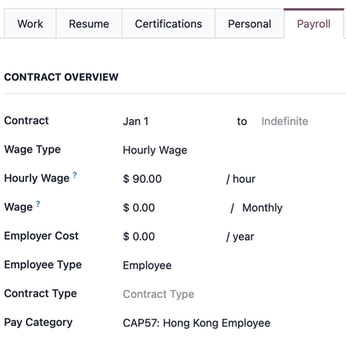
Seção MPF
Exempt of MPF: Enable this option for MPF-exempt employees.
MPF Scheme: Select the MPF scheme.
Member Account No.: Enter the employee's member account number.
Payroll Group: Select the MPF payroll group.
Member Class: Select the MPF member class for voluntary contributions.
Registration Status: Define employee status.
Registration At Next Contribution: Select for enrolling a new MPF member.
Registered: Select for an existing MPF member.
Terminated: Select for a terminated MPF member.
Start Contribution: Define the contribution starting period for new or existing members.
Immediately Upon Registration: Start contribution after registering MPF, starting from the first payslip.
At Due Date: Start contribution after the contribution holiday period. This starts its contribution mostly in the second or third payslip.
Date of Joining the Scheme: Leave empty to set the date automatically upon registration through the eMPF contribution report date.
Seção de Benefícios
Internet Subscription: Set an additional internet allowance on top of the current salary package.
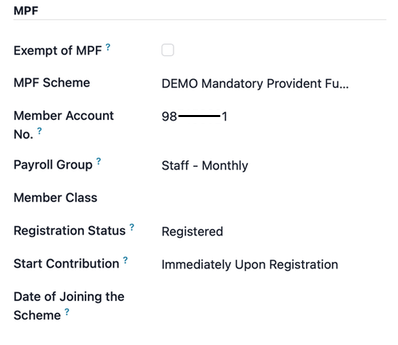
Current Rental: Configure rental information that is used as a rental allowance in the payslip for the IR56B reporting period.
Para criar um registro de aluguel: Clique no botão Histórico próximo ao campo de aluguel atual. Clique em Novo para criar um histórico de aluguel. Digite a referência de aluguel, data de início do aluguel, data de término do aluguel, tipo de aluguel, valor do aluguel e endereço. Altere o status do aluguel para Em Andamento.
Executar folha de pagamento HK
Antes de executar a folha de pagamento, o oficial de folha de pagamento deve validar as entradas de trabalho do funcionário para confirmar a precisão do pagamento e detectar erros. Isso inclui verificar se todos os períodos de folga estão aprovados e se qualquer hora extra é apropriada.
As entradas de trabalho são sincronizadas com base na configuração do contrato do funcionário. O Odoo extrai da agenda de trabalho atribuída, registros de presença, cronograma de planejamento e períodos de folga aprovados. Qualquer discrepância ou conflito deve ser resolvido e as entradas de trabalho podem ser regeneradas.
Quando tudo estiver correto, contracheques em rascunho podem ser criados individualmente ou em grupos, referidos no aplicativo Folha de Pagamento como execuções de pagamento.
Contracheque individual
Para criar um contracheque individual no aplicativo Folha de Pagamento: Vá para . Clique em Novo Fora do Ciclo para criar um contracheque para um único funcionário. Selecione o funcionário e o período.
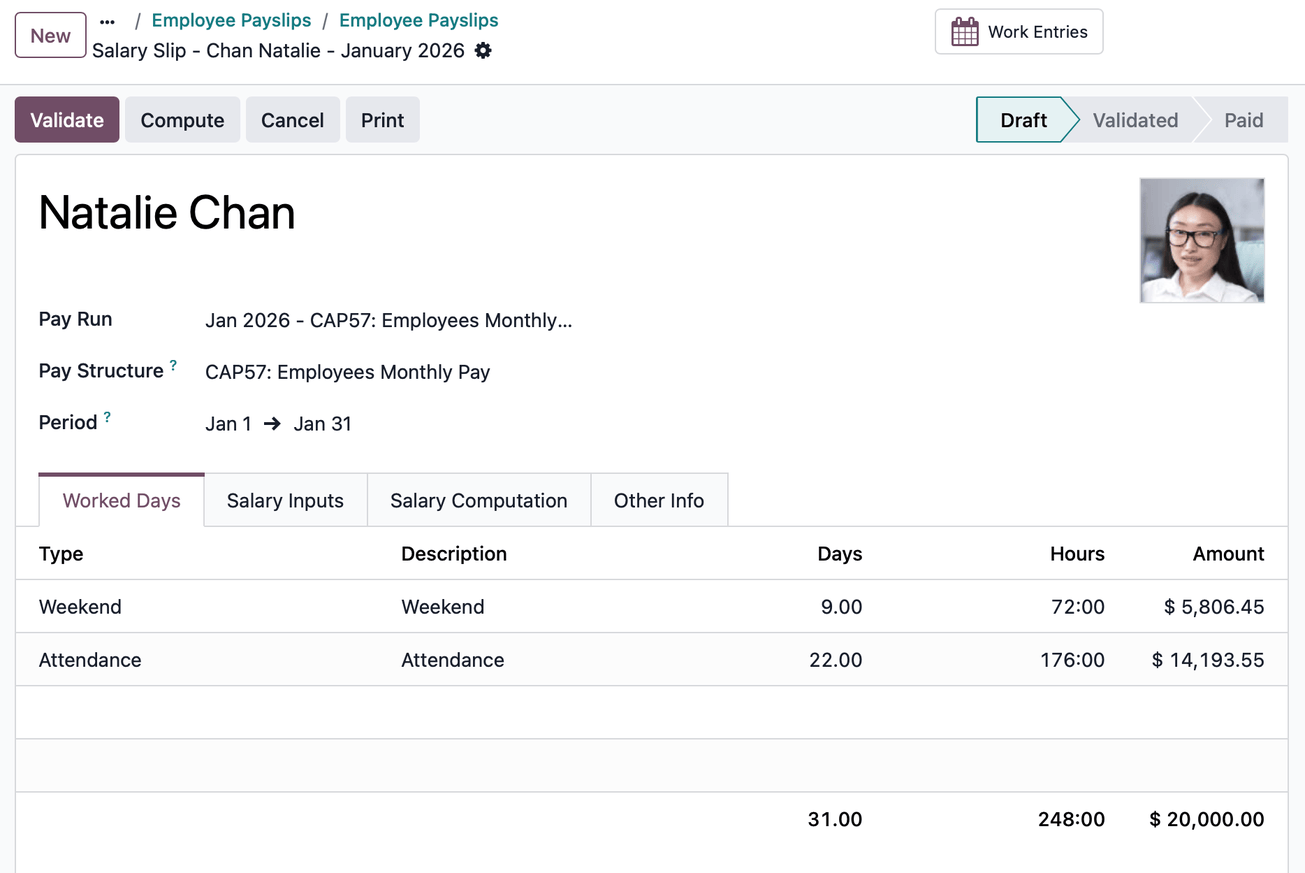
Quando os contracheques estiverem em rascunho, revise-os quanto à precisão. Verifique a guia Dias Trabalhados, a guia Entradas de Salário e a guia Outras informações. Certifique-se de que o tempo de trabalho listado está correto, bem como quaisquer outras entradas. Adicione qualquer entrada opcional ausente, como comissões, gorjetas, reembolsos, etc.
Clique no botão Calcular Planilha e depois clique no botão Validar.
Execução de pagamento em lote (contracheques em grupos)
Para criar uma execução de pagamento em lote no aplicativo Folha de Pagamento: Vá para . Clique em Novo para criar uma nova execução de pagamento. Selecione a estrutura salarial, cronograma de pagamento, esquema MPF, grupo de folha de pagamento e período.
Selecione o(s) funcionário(s). Uma execução de pagamento é criada junto com os contracheques do funcionário em rascunho. Verifique todos os cálculos e clique no botão Validar.

Verificação contábil
O processo contábil ao executar a folha de pagamento tem dois componentes: criação de lançamentos contábeis e registro de pagamentos. Para cada componente, há dois cenários possíveis: individual ou em lote.
Criação de lançamento contábil
Depois que os contracheques são confirmados e validados, os lançamentos contábeis são postados individualmente ou em lote. O lançamento contábil é criado primeiro como rascunho.
Lançamentos de diário individuais
Sem ativar a opção de linhas de movimento contábil em lote, você precisa de lançamentos de diário manuais para cada contracheque, independentemente de usar uma execução de folha de pagamento ou contracheque individual. Selecione um contracheque e clique no botão Lançamento Contábil (Rascunho).
Clique no botão Lançar. Cada contracheque é automaticamente lançado como lançamentos de diário individuais em .
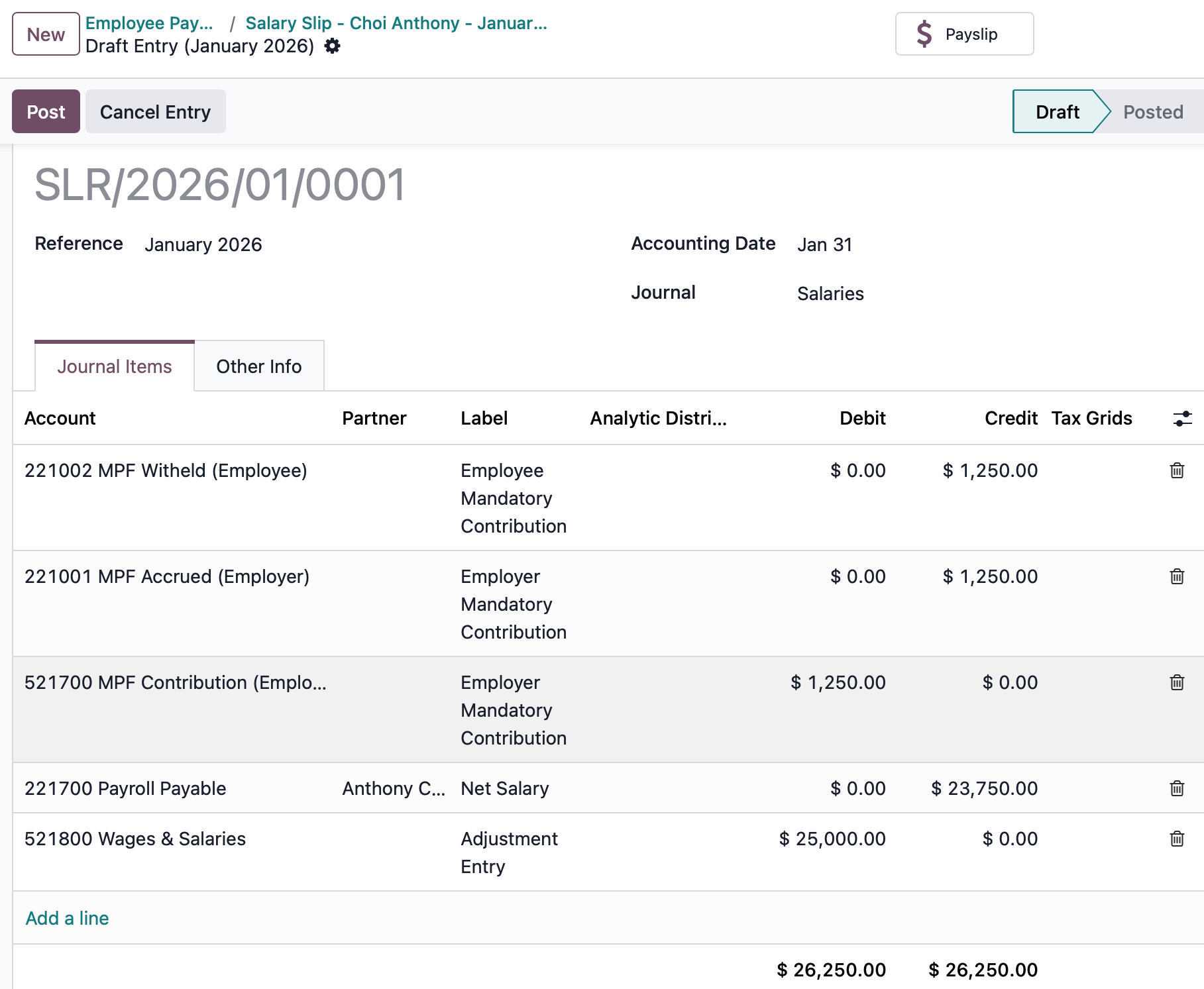
Quatro contas do Plano de Contas de Hong Kong estão incluídas na localização de folha de pagamento:
221001 MPF Accrued (Employer): Accrue MPF benefits that are spent by employers.
221002 MPF Withheld (Employee): Withheld MPF benefits that are paid by employees, which are paid to the MPF provider soon.
521700 MPF Contribution (Employer): Employer portion of MPF contributions expected to be paid to the MPF provider soon.
221700 Salaries & Wages Payable: Net salary owed to the employee.
Lançamentos em lote
Ativar Linhas de Movimento Contábil em Lote agrega todas as entradas contábeis do período em uma única linha de movimento contábil. Clique no botão Lançamento Contábil (Rascunho) (que aparece apenas após ativar o lançamento contábil em lote na configuração de folha de pagamento para execuções de folha de pagamento). Clique no botão Lançar. Todos os contracheques são automaticamente consolidados em um lançamento contábil.
Registrar pagamento
Após os lançamentos contábeis serem validados, o Odoo gera arquivos de relatório de pagamento.
HSBC Auto Pay Report: Click HSBC Auto Pay Report. (You must configure the HSBC Autopay bank account in configuration for this button to appear). Configure the HSBC Autopay report information. Click the Confirm button. Click the download icon to download the .apc HSBC report.
Payment Report: Click Payment Report. Payments can be grouped by partner if there is a partner associated with a salary rule. Select the export format and click Generate to download the CSV.
Relatórios de folha de pagamento
A localização de Hong Kong contém vários relatórios exclusivos de HK, que fornecem relatórios de contribuição eMPF e relatórios IR56 gerados automaticamente (nos formatos .xml e PDF).
Relatórios de contribuição eMPF
Os relatórios de contribuição eMPF podem ser gerados de duas formas:
Auto generated reports: After every pay run, eMPF contributions reports can be found in .
Manual generated reports: eMPF contribution reports can be generated manually only after the payslips are validated.
Clique em . Clique em Novo. Selecione o período de contribuição, o esquema e o grupo de folha de pagamento para gerar o relatório.
Status do membro:
Existing Member: Employees making monthly contributions.
New Member: New employees in holiday periods for contributions.
Terminated Member: Employee leaving the company.
Pagamento de rescisão:
L: Appears if a leaving employee has a long service payment.
S: Appears if a leaving employee has a severance payment.
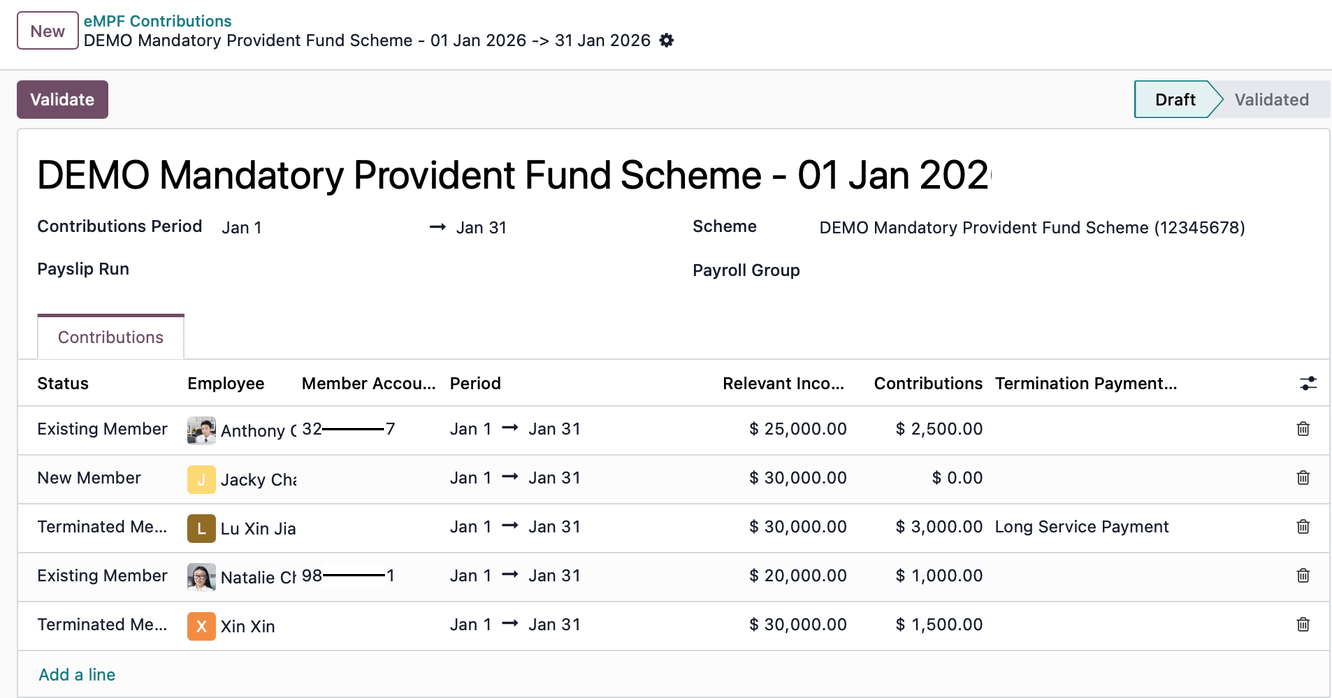
Clique no botão Validate. Se não houver erros, relatórios de contribuição eMPF são gerados em três arquivos .csv diferentes dentro de um arquivo zip, que estão prontos para serem enviados para o portal eMPF: new employees.csv, contributions.csv e terminated employees.csv.
Relatórios IR56
O Odoo fornece quatro relatórios IRD:
IR56B (Annual Return): The Employer's Return of Remuneration and Pensions; submitted annually for all existing employees.
IR56E (New Hire): Notification of Commencement of Employment; submitted for new employees within three months of their start date.
IR56F (Termination): Notification of Cessation of Employment for employees leaving the company but remaining in Hong Kong.
IR56G (Departure): Notification of Cessation of Employment for employees leaving Hong Kong permanently or for a long period.
Gerando um relatório IR56
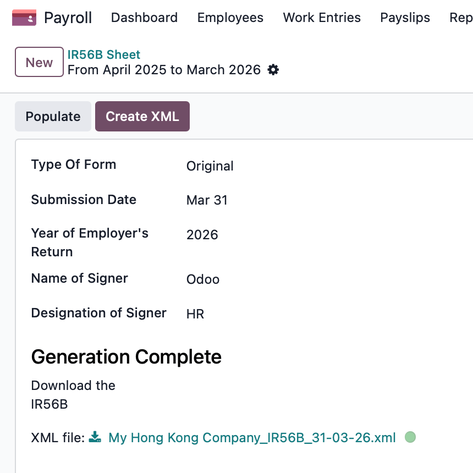
Vá para e selecione uma das opções de planilha IR56B/E/F/G. Clique em New. Preencha as informações relevantes para o relatório IRD (por exemplo, Submission Date, Year of Employer's Return). Clique no botão Populate.
Os botões inteligentes Create XML e Eligible Employees aparecem se houver informações de contracheque relevantes geradas. Clique em Create XML para baixar o relatório XML. Clique em Eligible Employees para visualizar a lista e selecione Generate PDFs para enfileirar a geração de documento PDF.
Abas do contracheque
Diferentes abas em cada contracheque definem dias trabalhados usados para calcular a folha de pagamento, entradas salariais adicionais para adicionar ao contracheque, como o cálculo de salário é tratado e outras informações que impactam o contracheque.
Worked Days: Details all the individual attendance records for the time period, including both worked time and any time off taken. It is auto-populated and cannot be edited.
Salary Inputs: Details where additional salary inputs are listed, such as deductions, reimbursements, and expenses. Click Add Inputs to manually include them.
Salary Computation: Where all the individual salary rules are listed and calculated, including everything from the employee's salary to all the deductions, taxes, and MPF contributions.
Other Info: Shows the Average Daily Wage rate that is used to calculate statutory HK holidays and entitlements. Also contains the End-of-Year Pay :
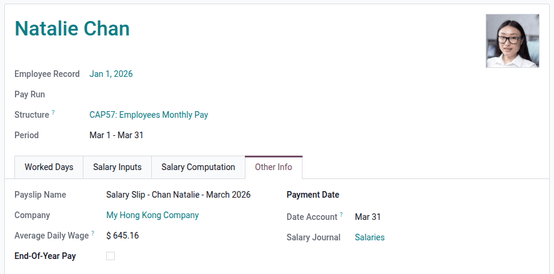
Compreendendo a folha de pagamento de Hong Kong
Em Hong Kong, os cálculos de folha de pagamento normalmente seguem uma fórmula padrão de salário diário:
No entanto, a Lei de Emendas Trabalhistas de 2007 (frequentemente chamada de "Ordenação 713") exige que os empregadores usem o Salário Diário Médio (ADW) ao calcular direitos estatutários específicos. Os direitos estatutários que exigem ADW incluem: pagamento de férias, pagamento de licença anual, subsídio de doença, pagamento de licença maternidade, pagamento de licença paternidade, pagamento de fim de ano e pagamento em lugar de aviso prévio.
Para calcular o ADW, use os ganhos e dias dos 12 meses anteriores:
Onde:
Total Wage in 12-month period: All earnings in the last 12 months (e.g., basic salary, overtime, commissions, and allowances).
Wages of Non-full pay: Any wages paid at less than the full rate (e.g., sick leave, maternity/paternity leave, etc).
Total Days in 12-month period: Total calendar days in the 12-month reference period.
Days of Non-full pay: The specific number of days for which the employee was not paid in full.
Exemplos de cálculo
CAP 57: Pagamento Mensal de Funcionários
Calcule o contracheque de março para Natalie Chan que ingressou em 1º de janeiro de 2026, com um salário mensal de 20K.
Jan: Monthly salary 20K.
Feb: Monthly salary 20K and 5K commission.
Mar: Apply for one full-paid paternity leave and one sick leave with 80% ADW in March.
Calcular ADW:
Total wages earned: 20,000 + 25,000 = 45,000
Total days: 31 + 28 = 59 days
Calcular pagamento de licença e salários totais:
One full day paternity leave (full paid ADW) = 762.71
One full day sickness leave 80% (80% paid ADW) = 762.71 * 80% = 610.17
Attendance = Daily wage * num of working days = (20,000 / 31) * 20 = 12,903.23
Weekend = Daily wage * num of weekends = (20,000 / 31) * 9 = 5,806.45
Wages earned for Mar = 762.71 + 610.17 + 12,903.23 + 5,806.45 = 20,082.56
Calcular contracheque em conformidade com HK:
Basic salary = 20,082.56
MPF gross = 20,082.56
Employee mandatory contribution = 20,082.56 * 5% = 1,004.13
Net salary earned for Mar = 20,082.56 - 1,004.13 = 19,078.43
CAP 57: Pagamento em Lugar de Aviso Prévio
Calcule o pagamento em lugar de aviso prévio para Natalie Chan que ingressou em 1º de janeiro de 2026, com um salário mensal de 20K e foi demitida em março com um mês de pagamento em lugar de aviso prévio.
Jan: Monthly salary 20K.
Feb: Monthly salary 20K and 5K commission.
1. Calcular salário mensal médio:
Days in average month: 365 days / 12 months = 30.41667 days
2. Calcular compensação em lugar de aviso prévio:
SEÇÃO 57: Pagamento por Serviço de Longo Prazo
Calcular pagamento por serviço de longo prazo para Anthony Choi que ingressou em 1º de jan de 2021, com salário mensal de 20K e deixa a empresa em 28 de fev de 2026.
Jan: Monthly salary 20K.
Feb: Monthly salary 20K.
1. Calcular pagamento por serviço de longo prazo:
O registro do salário mensal do último mês deve estar no Odoo para calcular SP/LSP. O LSP é baseado em pré/pós transição de acordo com a calculadora HK Labour:
2. Calcular pagamento por serviço de longo prazo com desconto de MPF:
Pre-transition offset: Total employee mandatory contributions made before May 2025 can be excluded from the long service payment. Example: If Anthony's total employee mandatory contribution before May 2025 was 7,047.98, this amount is treated as a pre-transition offset and excluded from the long service payment.
Post-transition offset: Employee mandatory contributions made after May 2025 cannot be excluded (no post-transition offset).
SEÇÃO 57: Pagamento de Indenização
Calcular indenização para Anthony Choi que ingressou em 1º de jan de 2023, com salário mensal de 20K e deixa a empresa em 28 de fev de 2026.
Jan: Monthly salary 20K.
Feb: Monthly salary 20K.
1. Calcular indenização:
O registro do salário mensal do último mês deve estar no Odoo para calcular SP/LSP. O SP é baseado em pré/pós transição de acordo com a calculadora HK Labour:
2. Calcular indenização com desconto de MPF:
Pre-transition offset: Total employee mandatory contributions made before May 2025 can be excluded from the severance payment. Example: If Anthony's total employee mandatory contribution before May 2025 was 7,047.98, this amount is treated as a pre-transition offset and excluded from the severance payment.
Post-transition offset: Employee mandatory contributions made after May 2025 cannot be excluded (no post-transition offset).