Conjuntos de regras de horas extras
O aplicativo Attendances do Odoo permite a configuração de regras de horas extras para determinar se e quando os funcionários ganham horas extras, e em qual taxa.
Criar um conjunto de regras de horas extras
Para criar um conjunto de regras de horas extras, navegue até . Todos os conjuntos de regras de horas extras existentes aparecem em uma visualização de lista padrão e exibem o Nome do conjunto de regras, o Modo de taxa e a Contagem de regras (o número de regras configuradas para o conjunto de regras).
Clique no botão Novo e um formulário em branco Conjuntos de regras é carregado. Digite as seguintes informações na metade superior do formulário:
Ruleset Name: Enter a name for the ruleset.
Rate Combination Mode: Using the drop-down menu, select how the overtime rate is calculated. The options are:
Maximum Rate: The highest rate is used to determine the overtime pay. For example, if there are two available rates of 150% and 125%, the highest available rate, 150%, is applied.
Sum of all rates: A combination of all applicable overtime rates is used to calculate the overtime pay. Odoo calculates the rate by adding the extra pay rates (above 100%).
Duas taxas de horas extras são criadas, uma para 150% e a outra para 120%. A opção Soma de todas as taxas é selecionada. A taxa de horas extras aplicada é 170%.
O cálculo usado para determinar essa taxa é: 100% (linha de base) + (150-100)% + (120-100)% = 170%.
Description: Enter a brief description for the ruleset.
Country: Using the drop-down menu, select the country the ruleset applies to.
Regras de horas extras
Após a criação das informações principais do conjunto de regras, a próxima etapa é adicionar as regras individuais. Clique em Adicionar uma linha na parte inferior da aba Regras de horas extras do formulário Conjunto de regras, e uma janela pop-up Criar regra é carregada.
Digite o Nome da regra no campo correspondente. Em seguida, digite as seguintes informações na aba Definição:
Seção Condição
Esta seção determina qual tempo registrado conta como horas extras. As regras podem ser baseadas em quantidade <attendnaces/quantity> ou tempo <attendnaces/timing>.
Baseado em quantidade
Se as horas extras são acumuladas quando o total de horas registradas por dia ou semana excedem o esperado, selecione o botão de opção Quantidade para o campo A regra é baseada em. Configure o resto dos campos na seção Condição da seguinte forma:
If the worked hours on a (Day/Week) differs: First, select if the total expected time is calculated by the Day or Week, using the drop-down menu. Next, select if the difference is compared:
from the amount defined on the contract: Select this option if the overtime is based on the working hours defined on the employees contract <payroll/gen-info>.
from a specific duration: Select this option if the overtime is based on a specified amount of time. If this is selected, a Duration to exceed field appears. Enter the number of hours in an HH:MM format the employee must exceed each Day or Week, depending on what is selected in the If the worked hours on a (Day/Week) differs field.
With a tolerance in favor of the employer of: This field defines a buffer of time that is not considered overtime. Enter the amount in a HH:MM format. For example, if this field is set to 00:15, and an employee logs an 8 hour and 13 minute workday, the extra 13 minutes is not counted as overtime.
With a tolerance in favor of the employee of: Enter the amount of extra time given to an employee as overtime, in a HH:MM format. For example, if this field is set to 00:15, and an employee logs an 8 hour and 48 minute workday, the missing 12 minutes are counted as overtime, for a total of one full hour of overtime (instead of only 48 minutes of overtime).
Baseado em tempo
Se as horas extras são acumuladas apenas em dias específicos ou em horários específicos, selecione o botão de opção Tempo para o campo A regra é baseada em. Configure o resto dos campos na seção Condição da seguinte forma:
With a tolerance in favor of the employer of: This field defines a buffer of time that is not considered overtime. Enter the amount in a HH:MM format. For example, if this field is set to 00:15, and an employee logs a 40 hour and 13 minute workweek, the extra 13 minutes is not counted as overtime.
With a tolerance in favor of the employee of: Enter the amount of extra time given to an employee as overtime, in a HH:MM format. For example, if this field is set to 00:15, and an employee logs a 40 hour and 48 minute workweek, the missing 12 minutes is counted as overtime, for a total of one full hour of overtime (instead of only 48 minutes of overtime).
If the employee works: Click the radio button to select the period of time defined for accruing overtime. The options are:
On any working day: Select this option if overtime is accrued if an employee works outside of a specified set of hours for any working day. When selected, a Between field appears, listing 00:00 and 24:00 hours, by default. Adjust the working times in an HH:MM for both fields, defining the specific working hours an employee earns overtime for.
As horas Entre são definidas como 09:00 e 17:00. Um funcionário trabalha das 7:00 AM até as 4:00 PM. O funcionário ganha 2 horas de hora extra, pelas horas entre 7:00 AM e 9:00 AM.
On any non-working day: Select this option if overtime is accrued if an employee works outside of a specified set of hours for any non-working day. When selected, a Between field appears, listing 00:00 and 24:00 hours, by default. Adjust the working times in an HH:MM for both fields, defining the specific working hours an employee earns overtime for.
When employee is off: Select this option if overtime is accrued on any day the employee is not scheduled to work.
Outside of a specific schedule: Select this option if overtime is accrued when employees work outside of a selected working schedule. When selected, a Schedule field appears. Using the drop-down menu, select the working schedule used to determine overtime.
Seção Ação
Uma vez que os critérios definidos na seção Condição são atendidos, a seção Ação determina como qualquer tempo extra aprovado é tratado.
Pay extra hours: Enable this checkbox if overtime hours are paid out. If enabled, a percentage field appears to the right of the checkmark, populated with the rate defined on the overtime work entry type <payroll/work-entry-types>.
Work entry type to use: This field only appears if the Pay extra hours field is enabled. Using the drop-down menu, select what work entry type <payroll/work-entry-types> is created for the overtime. By default, Overtime Hours is selected.
Give back as time off: Enable this checkbox if the overtime should be converted to time off, instead of being paid out.
Exemplo de conjunto de regras de horas extras
Uma empresa com sede nos Estados Unidos deseja conceder horas extras em vez e meia a todos os funcionários que trabalham mais de suas 40 horas semanais de trabalho, ou trabalham em qualquer dia não útil. Para configurar isso, eles criam um conjunto de regras chamado Horas Extras, com um Modo de Combinação de Taxa definido como Taxa Máxima. O país é definido como Estados Unidos, e uma Descrição é inserida explicando as regras de horas extras.
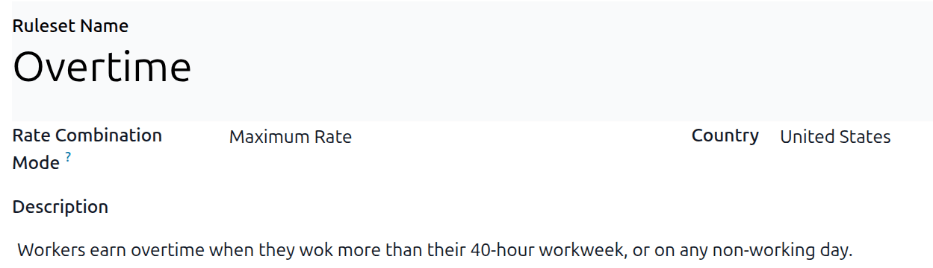
Duas regras são configuradas na aba Regras de Horas Extras: Regra de Agenda do Funcionário <attendnaces/schedule-rule> e Regra de Dias Não Úteis <attendnaces/hours-rule>.
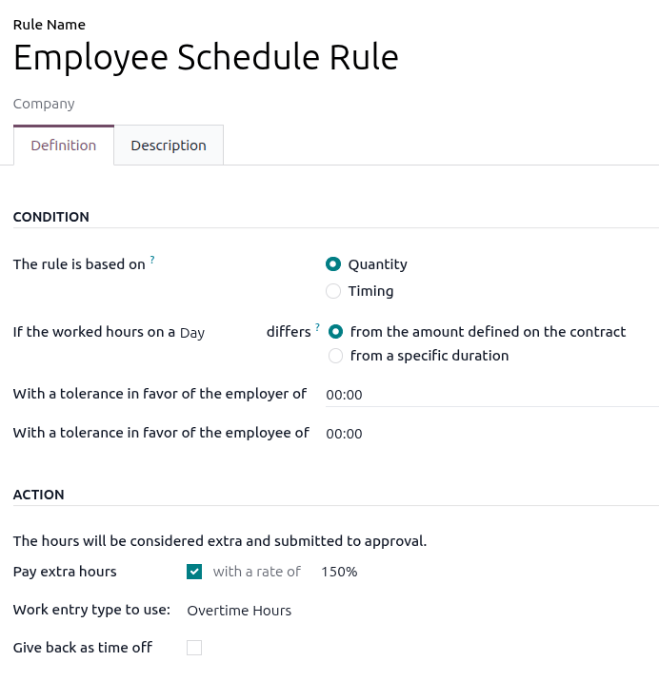
Regra de agenda do funcionário
A Regra de Agenda do Funcionário é baseada em Quantidade, e funcionários acumulam horas extras se trabalham mais do que o valor definido no contrato em qualquer Dia. Nenhuma tolerância definida para funcionário ou empregador. Se o funcionário trabalha hora extra, ele é pago a uma taxa de 150%, e o tempo é registrado como Horas Extras em seu registro de presença.
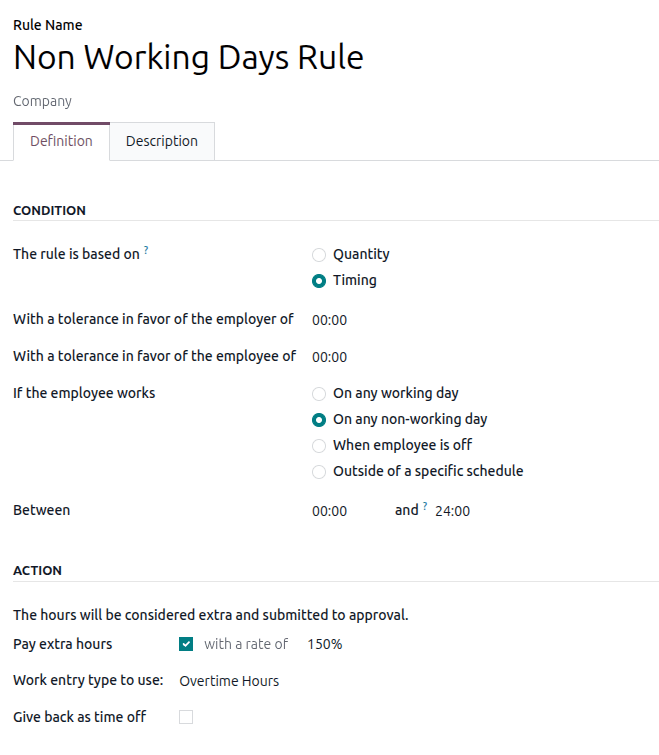
Regra de dias não úteis
A Regra de Dias Não Úteis é baseada em Horário, e funcionários acumulam horas extras se trabalham em qualquer dia não útil, independentemente do horário. Nenhuma tolerância definida para funcionário ou empregador. Se o funcionário trabalha hora extra, ele é pago a uma taxa de 150%, e o tempo é registrado como Horas Extras em seu registro de presença.