Contabilidade analítica
A contabilidade analítica ajuda a rastrear custos e receitas e analisar a rentabilidade de um projeto ou serviço. Ao criar lançamentos contábeis, os custos podem ser distribuídos <accounting/analytic_accounting/analytic-distribution> em uma ou mais contas analíticas.
Para ativar este recurso, vá para e ative Contabilidade Analítica na seção Análise.
Contas analíticas
As contas analíticas fornecem uma visão geral dos custos e receitas.
Para acessar contas analíticas, vá para . Para criar uma nova conta analítica, clique em Novo e preencha as seguintes informações:
Analytic Account: Assign the name of the analytic account.
Customer: Select the customer linked to the project, if applicable.
Reference: Include a reference to make the account easier to find if needed.
Plan: Link the Analytic Account to an analytic plan <accounting/analytic_accounting/analytic_plans>.
Company: In a multi-company environment, select the company using the analytic account. To make the analytic account accessible to all companies, leave the field empty.
Currency: Update the currency of the analytic account if needed.
Em seguida, as informações do orçamento podem ser preenchidas.
Planos analíticos
Os planos analíticos agrupam contas analíticas <accounting/analytic_accounting/analytic_accounts>, permitindo que a empresa analise sua contabilidade, como rastrear custos e receitas por projeto ou departamento.
Para acessar planos analíticos, vá para . Clique em Novo para criar um novo plano, adicione um nome e preencha as seguintes informações:
Parent: Link the plan to another analytic plan if a hierarchy between plans must be built.
Default Applicability: Define how the plan is applied when creating a new journal entry:
Optional: Adding the analytic plan is not mandatory.
Mandatory: The entry cannot be confirmed if no analytic account is selected.
Unavailable: The plan is not available.
Color: Set a color for the tag related to this specific plan.
Para ajustar a aplicabilidade de um plano, crie uma nova linha na aba Aplicabilidade e defina os seguintes campos:
Domain: Choose the accounting documents to which the plan applies.
Financial Accounts Prefixes: Enter the prefix(es) of the account(s) to which the plan applies.
Product Category: Choose the product category to which the plan applies.
Applicability: Define how the plan is applied when creating a new journal entry. The applicability set here always overrides the default applicability.
Company: In a multi-company environment, select the company using the plan. To make the analytic plan accessible to all companies, leave the field empty.
Dois botões inteligentes estão disponíveis:
Subplans: To have a more complex analytic structure. Click the smart button, then click New to add a subplan. This creates a parent-child relationship between the two plans, and the Parent field of the subplan is automatically populated with the original plan.
Analytic Accounts: To access the analytic accounts <accounting/analytic_accounting/analytic_accounts> linked to the plan.
Distribuição analítica
A distribuição de custos em uma ou mais contas analíticas pode ser definida em cada fatura/conta a pagar <accounting/analytic_accounting/distribution-invoices-bills> ou em massa <accounting/analytic_accounting/distribution-mass>.
Distribuição analítica em faturas ou contas a pagar
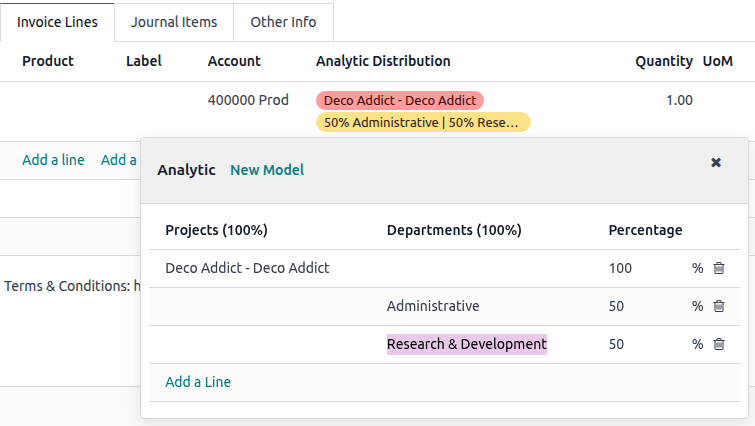
Para adicionar distribuição analítica, clique na coluna Distribuição Analítica ao criar uma fatura <accounting/invoice/creation> ou conta a pagar <accounting/vendor_bills/creation>.
Na janela Analítico, selecione as Contas Analíticas desejadas nos diferentes Planos Analíticos exibidos em colunas. Em seguida, divida os custos entre as contas modificando o percentual.
Distribuição analítica em massa
Para editar em massa contas analíticas em várias lançamentos simultaneamente, vá para , e selecione os que precisam ser atualizados. Clique na coluna Distribuição Analítica e adicione a distribuição necessária na coluna Analítico, depois clique no oi-close (cruz) e em Atualizar. A distribuição analítica é então adicionada aos lançamentos do diário selecionados.
Modelos de distribuição analítica
Os modelos de distribuição analítica aplicam automaticamente uma distribuição específica com base em critérios definidos.
Para criar um novo modelo de distribuição analítica, vá para , clique em Novo, e defina as condições que o modelo deve atender para ser aplicado automaticamente:
Accounts Prefixes: Apply the distribution model only to journal items involving accounts that begin with specific prefixes.
Partner: Apply the distribution model only to journal items involving a specific partner.
Product: Apply the distribution model only to journal items involving a specific product.
Company: In a multi-company environment, apply the distribution model only to journal items involving a specific company. To apply it across all companies, leave the field empty.
Analytic Distribution: Analytic distribution <accounting/analytic_accounting/analytic-distribution> that will be applied when the above conditions are met.
Para automatizar essa distribuição, o Prefixo de Contas pode ser definido como 601, pois Utilidades (601000) é a única conta no plano de contas que começa com 601.
Se contas adicionais como Eletricidade (601100) ou Gás (601200) estiverem disponíveis no plano de contas, a distribuição também se aplicará a ambas, pois compartilham o mesmo prefixo.
Para definir mais critérios, use o ícone oi-settings-adjust (ajustar configurações) para revelar mais colunas ou clique em Visualizar em um modelo de distribuição analítica individual.
Partner Category: Apply this distribution model only to journal items involving a partner in a specific category.
Product Category: Apply this distribution model to journal items involving a product in a specific category.