Guatemala
Introdução
Com a localização guatemalteca, você pode se conectar à autoridade fiscal Superintendencia de Administración Tributaria (SAT) para gerar documentos eletrônicos com seu XML, folio fiscal e assinatura eletrônica.
Os documentos suportados são:
FACT-Factura,
FCAM-Factura Cambiaria,
FPEQ-Factura de Pequeño Contribuyente,
NCRE-Credit Note,
NDEB-Debit Note,
NABN-Nota de Abono,
FCAP-Factura Cambiaria Pequeño Contribuyente,
FACT-Factura with Export Complement.
A localização requer uma conta Infile, que permite aos usuários gerar documentos eletrônicos dentro do Odoo. Para solicitar uma conta Infile, preencha o Formulário de Registro Infile.
Glossário
Os seguintes termos são usados em toda a localização guatemalteca:
SAT: Superintendencia de Administración Tributaria is the government entity responsible for enforcing tax payments in Guatemala.
FEL: Factura Electrónica en Línea is the electronic invoicing system mandated by the SAT in Guatemala, which requires businesses to issue and manage electronic documents in compliance with local regulations.
EDI: Electronic Data Interchange refers to the sending of electronic documents.
Infile: is the third-party organization that facilitates the interchange of electronic documents between companies and the Guatemalan government.
UUID: Universally Unique Identifier is a unique alphanumeric code assigned by the SAT to each certified electronic document in the FEL system, used for traceability and official validation.
Phrases: Type of Phrases with specific Scenario Codes are used in the Guatemalan localization to comply with the requirements of the SAT. They should be added depending on the issuer regime, receiver, and operation type. These phrases are used in the XML and PDF documents.
Establishment Code: A unique identifier assigned by the SAT to each business establishment, which is required for electronic invoicing.
Quetzal: The official currency of Guatemala, represented by the symbol GTQ. This is the base currency for all financial transactions in the Guatemalan localization.
Configuração
Instalação de módulos
Instale <general/install> os seguintes módulos para obter todos os recursos da localização guatemalteca:
Name |
Technical name |
Description |
|---|---|---|
Guatemala - Accounting |
l10n_gt |
The default fiscal localization package. It adds accounting characteristics for the Guatemalan localization, which represent the minimum configuration required for a company to operate in Guatemala according to the guidelines set by the SAT (Superintendencia de Administración Tributaria). The module's installation automatically loads the chart of accounts and taxes. |
Guatemala Accounting EDI |
l10n_gt_edi |
Includes all the technical and functional requirements to generate and validate Electronics Documents, based on the technical documentation published by the SAT (Superintendencia de Administración Tributaria). The authorized documents are listed above <guatemala/intro>. |
Empresa
Para configurar as informações da sua empresa, abra o aplicativo Configurações, role para baixo até a seção Empresas, clique em Atualizar Informações e configure o seguinte:
Company Name
Address, including the Street, City, State, ZIP, and Country
Tax ID: Enter the identification number for the selected taxpayer type.
VAT Affiliation: Select the VAT affiliation for the company, which is the type of Regime the company belongs to.
Legal Name: The legal name of the company, which is used in the XML and PDF documents.
Establishment Code: A necessary part of the XML when creating an electronic document. If this field is not set, all electronic documents will be rejected.
Para localizar o Código de Estabelecimento em sua conta SAT, vá para . A lista de estabelecimentos registrados é exibida junto com seus códigos correspondentes.
Credenciais de faturação eletrônica
Na Guatemala, a faturação eletrônica é obrigatória para a maioria das empresas. O Odoo se conecta com o provedor autorizado, Infile, para gerar e enviar documentos eletrônicos ao SAT (Superintendencia de Administración Tributaria) para validação.
Antes de emitir documentos eletrônicos, você deve configurar e conectar o Odoo ao Infile para garantir que sejam adequadamente validados e atribuídos a um UUID (Universally Unique Identifier) oficial.
Infile
Assine um contrato de serviço diretamente com Infile. O Infile fornecerá as credenciais necessárias para inserir no Odoo.
Odoo
No Odoo, após concluir o processo Infile, navegue para , role para baixo até a seção Localização Guatemalteca e siga estes passos:
Select the Infile Web Services environment, either Test or Production.
Enter the Infile Credentials:
Infile WS Username or Prefix
Infile Token
Infile Key
Click on Save.
Multíplas moedas
A taxa oficial de câmbio de moeda na Guatemala é fornecida pelo Banco da Guatemala. O Odoo pode se conectar diretamente aos seus serviços e obter a taxa de câmbio de forma automática ou manual.
Dados mestres
Plano de contas
O plano de contas é instalado por padrão como parte do conjunto de dados incluído no módulo de localização, as contas são mapeadas automaticamente em impostos, contas a pagar padrão e contas a receber padrão.
As contas podem ser adicionadas ou deletadas conforme as necessidades da empresa.
Contatos
Os campos a seguir devem ser preenchidos nos formulários de contato:
Company Name
Address, including the Street, City, State, ZIP, and Country
Identification Number:
Type: Select an identification type.
Number: Required to confirm an electronic invoice.
Impostos
Como parte do módulo de localização da Guatemala, os impostos são criados automaticamente com sua configuração e contas financeiras relacionadas.
Notas fiscais eletrônicas
Após a configuração bem-sucedida do banco de dados, documentos eletrônicos podem ser criados e enviados.
Uma vez que as faturas de cliente são validadas, elas podem ser enviadas eletronicamente para o SAT (Superintendencia de Administración Tributaria) via Infile, desde que os campos a seguir estejam preenchidos:
Customer: Type the customer's information.
GT Document Type: Select the type of document you want to create, i.e., FACT - Factura Electrónica or FCAM - Factura Cambiara. By default, the document type is set to FACT.
Due date: To compute if the invoice is due now or later.
Journal: Select the sales journal.
Products: Specify the product(s) with the correct taxes.
Quando concluído, clique em Confirmar.
Após a confirmação da fatura, clique em Enviar. No assistente que aparece, certifique-se de ativar as caixas de seleção Enviar para SAT e por Email para enviar o XML ao SAT (Superintendencia de Administración Tributaria) através do serviço web da Infile e a fatura validada ao email do cliente, e clique em Enviar. Em seguida, ocorre o seguinte:
The XML document is created.
The UUID (Universally Unique Identifier) is generated.
The XML is processed synchronously by Infile.
If accepted, the file is displayed in the chatter, and the email to the client with the corresponding pdf and xml file is sent.
If the file contains errors, a warning message displays the reason(s) and the email is not sent.

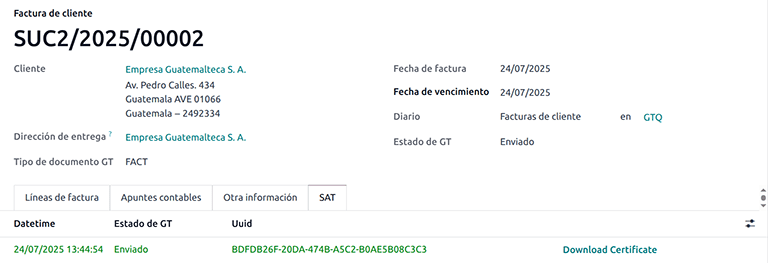
A aba SAT então exibe o seguinte:
Datetime: Timestamp recorded of the XML creation.
GT Status: Status result obtained in the SAT (Superintendencia de Administración Tributaria) response. If the file contains errors, a warning message displays the reason(s) and the email is not sent.
UUID: The unique identifier assigned by the SAT (Superintendencia de Administración Tributaria) to the electronic document.
Download Certificate: To download the sent XML file, even if the SAT (Superintendencia de Administración Tributaria) result was rejected.
Notas de débito e crédito
Para enviar uma nota de débito ou crédito à Infile, primeiro crie a nota de débito <accounting/credit_notes/issue-debit-note> ou nota de crédito <accounting/credit_notes/issue-credit-note>.
Em seguida, na janela Enviar, clique em Enviar para SAT (EDI Guatemalteca) para enviá-la para validação em tempo real. Após a validação bem-sucedida, o código QR da Infile é incorporado no PDF da nota de débito ou crédito.
Exportar faturas
As faturas de exportação devem atender às seguintes condições:
The customer's Identification type must be VAT, Passport, or Foreign ID.
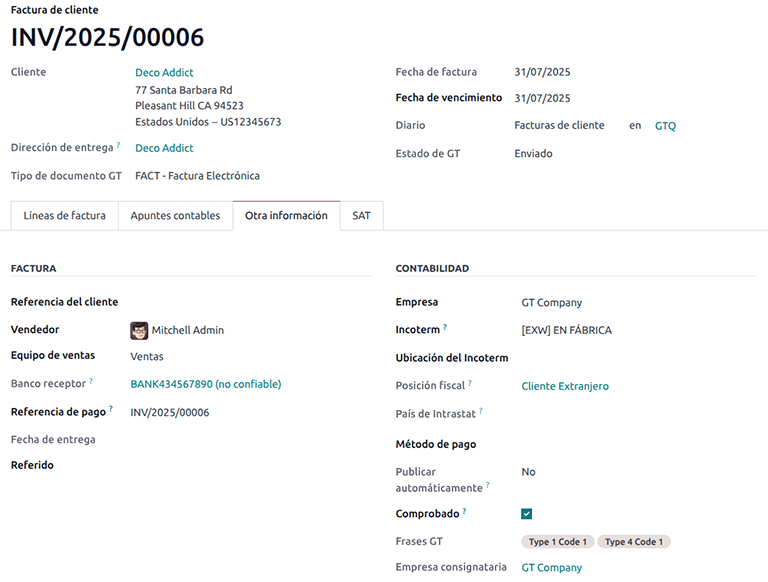
The following fields must be defined in the customer invoice's Other Info tab, under the Accounting section:
Incoterm
GT Phrases: Type 4 Code 1
Consignatory Company
All invoice lines must include taxes set to 0%.