Tipos de folga
One of the first things that requires configuration in the Time Off app are the time off types.
When employees request time off, they must specify the type of time off they are requesting, such as sick time, vacation time, etc. The time off type determines several things, including how the request is made (hours, half days, or days), and how it is approved <time_off/time-off-requests>.
Para visualizar os tipos de folga configurados atualmente, navegue até . Os tipos de folga são apresentados em uma visualização de lista.
The Time Off app comes with six preconfigured time off types: Paid Time Off, Sick Time Off, Unpaid, Compensatory Days, Extra Time Off, and Extra Hours. These can be modified to suit business needs, or used as-is.
Criar tipo de folga
To create a new time off type, navigate to . From here, click the New button to reveal a blank Time Off Type form. Then, enter the following information on the form.
Seção Informações gerais
This section outlines the high-level information for the time off type. Enter the following information at the top of the form:
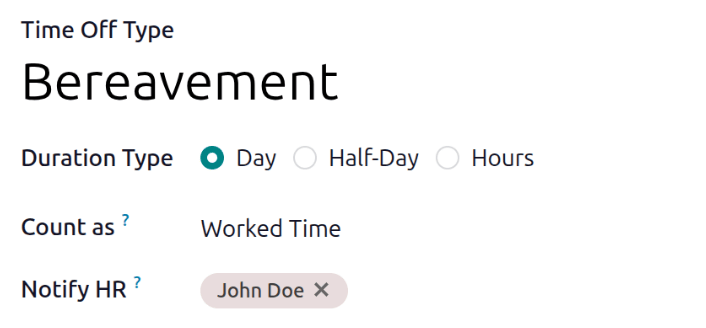
Time Off Type: Enter the name for the particular type of time off, such as Vacation or Bereavement.
Duration Type: Select the format the time off is requested in by clicking the corresponding radio button. The options are:
Day: Time off can only be requested in full-day increments (8 hours).
Half Day: Time off can only be requested in half-day increments (4 hours).
Hours: Time off can be taken in hourly increments.
Count as: Using the drop-down menu, select whether the time off type is counted toward accrual plans. Select Worked Time if the time off does count, select Absence if it does not count toward any type of accrual.
Notify HR: Select the user who is notified and responsible for approving requests and allocations for this specific type of time off. If this field is left blank, no one is notified.
Company: If multiple companies are created in the database, and this time off type only applies to one company, select the company from the drop-down menu. If this field is left blank, the time off type applies to all companies in the database. This field only appears in a multi-company database.
Country: If multiple countries are associated with the database, and this time off type is restricted to one country, select the country from the drop-down menu. If this field is left blank, the time off type applies to all countries. This field only appears in a multi-country database.
Seção de solicitações de folga
Esta seção determina como as aprovações são tratadas para solicitações de folga para este tipo de folga.
Select what specific kind of Approval is required for the time off type. The options are:
None Needed: No approvals are required when requesting this type of time off. The time off request is automatically approved.
By Time Off Officer: Only the specified time off officer, set on this form in the Notify HR field, is required to approve the time off request. This option is selected by default.
By Employee's Approver: Only the employee's specified approver for time off, which is configured in the Settings tab of the employee's form <employees/approvers>, is required to approve the time off request.
By Employee's Approver and Time Off Officer: Both the employee's specified time off approver <employees/approvers> and the time off officer are required to approve the time off request.
Seção de solicitações de alocação
Esta seção determina como as solicitações de alocação são tratadas para este tipo de folga.
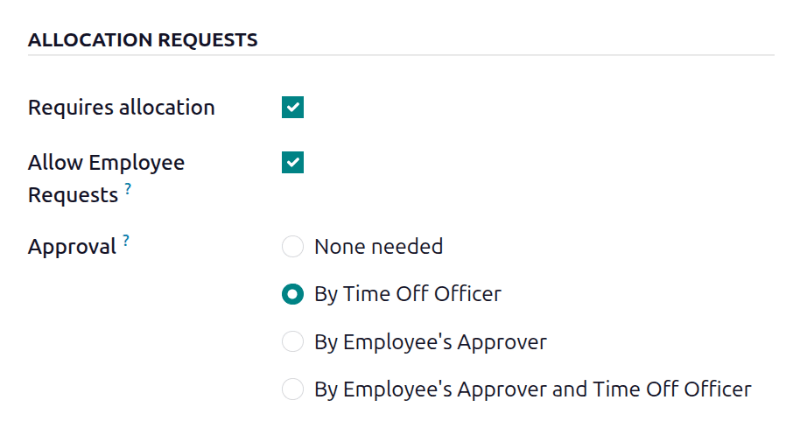
Requires allocation: If the time off must be allocated to employees, enable the checkbox. If the time off can be requested without time off being previously allocated, uncheck the box. If unchecked, no other options appear in the Allocation Requests section.
Allow Employee Requests: Check the checkbox if the employee should be able to request more time off than was allocated.
If employees should not be able to make requests for more time off than what was allocated, leave the box unchecked.
Approval: Select the type of approvals required for the allocation of this particular time off type.
None Needed: No approvals are required when requesting additional allocations for the time off type. The allocation request is automatically approved.
By Time Off Officer: Only the specified time off officer, set on this form in the Notify HR field, is required to approve the allocation request. This option is selected, by default.
By Employee's Approver: Only the employee's specified approver for time off, which is set on the Work Information tab on the employee's form <employees/work-info-tab>, is required to approve the allocation request.
By Employee's Approver and Time Off Officer: Both the employee's specified time off approver <employees/work-info-tab> and the time off officer are required to approve the allocation request.
Seção Configuração
This section determines all other details regarding the time off type, aside from approvals and allocations.
Ignore Public Holidays: Enable this option if public holidays should not be included in time off requests.
Esta opção reduz o trabalho extra para os usuários, permitindo que façam apenas uma solicitação de folga para a semana inteira, em vez de fazer duas solicitações separadas, uma para os dias antes do feriado e outra para os dias após o feriado.
Hide On Dashboard: Enable this option if this type of time off should not appear on the dashboard.
Require Supporting Document: Enable this option if the employee must attach documents to the time off request. This is useful in situations where documentation is required, such as long-term medical leave or jury duty.
Deduct Extra Hours: Enable this option if the time off request should factor in any extra time accrued by the employee.
Eligible for Accrual Rate: Enable this checkbox if the time off type is included when calculating worked time for an accrual plan. This is enabled by default.
Allow Request on Top: Enable this checkbox if the employee can request additional time off, stacked on top of this time off type.
Seção de limite negativo
Enable the Allow Negative Cap option if employees should be able to request more time off than they currently have, allowing a negative balance. If enabled, an up to field appears. In this field, enter the maximum amount of negative time allowed, in days.
O tipo de folga Férias tem a opção Permitir Limite Negativo ativada e a Quantidade Máxima Excedida é definida como cinco.
Essas configurações permitem que Sara envie uma solicitação de cinco dias do tipo de folga Férias. Se aprovada, seu saldo de folgas Férias será negativo em dois (-2) dias.
Seção Folha de pagamento
If the time off type should create ../../hr/payroll/work_entries in the Payroll app, specify the Work Entry Type from the drop-down list.
Seção de opção de exibição
Color: Select a color to be used in the Time Off app dashboard.
Cover Image: Select an icon to be used in the Time Off app dashboard.
