Recuperar códigos EPC
Códigos eletrônicos de produtos (EPC (electronic product code)) são identificadores globalmente únicos atribuídos a produtos específicos, permitindo que itens sejam distinguidos no nível individual. Estes identificadores suportam gestão precisa do inventário ao permitir contagens cíclicas mais rápidas, ajustes simplificados e controle de estoque mais preciso.
Depois que os EPCs são obtidos <barcode/operations/retrieve_epcs_gs1> da GS1 (Global Standards 1), eles são codificados <barcode/operations/write_epcs> em tags RFID (radio frequency identification), que são então aplicadas aos produtos e utilizadas em todo o processo de inventário.
Configurar ../setup/rfid
Recuperando EPCs do GS1
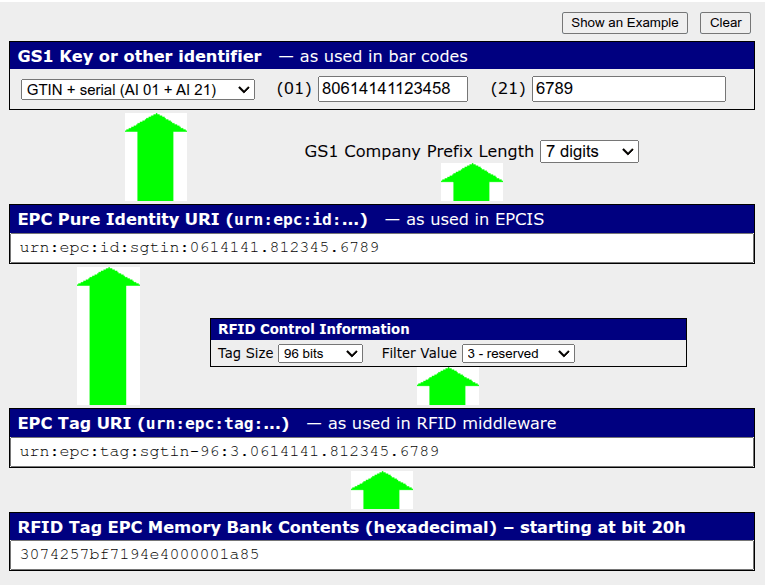
Para recuperar um EPC para codificar em uma tag, use a ferramenta EPC Encoder/Decoder do GS1.
Enter the GTIN-14 barcode of the product in the application identifier (01) field.
Enter the product's serial number in the (21) field.
Specify a company prefix length.
Specify the size of the tag and its filter value.
Gerando EPCs no Odoo
Gere EPCs para produtos rastreados diretamente no Odoo. Os produtos devem ser rastreados por número de série, mas isso não é um requisito. Um código de barras compatível com GTIN-14 deve estar definido no produto.
Para recuperar os EPCs de um recebimento de produtos:
On the receipt, click the fa-list Detailed Operations button next to the Quantity field. The Detailed Operations box opens.
From here, specify or generate serial numbers for the products. Be sure to save the serial numbers.
Validate the receipt.
Click the Moves smart button. Select all received items, then click the fa-cog Actions button, then select Export.
On the Export Data screen, select Electronic Product Code from the list of available fields, then click Export. The file downloads to the device. All of the EPCs for the receipt are included in that file.