IoT box
Para começar a usar uma IoT box:
Connect your devices to the IoT box.
Connect the IoT box to the network <iot/iot_box/network>.
Conexão de rede
A IoT box pode ser conectada à rede por meio de Ethernet <iot/iot_box/network-ethernet> ou Wi-Fi <iot/iot_box/network-wifi>.
Ethernet
Conecte o cabo Ethernet à porta Ethernet da IoT box e a uma porta disponível em seu roteador e, em seguida, conecte a IoT box a uma fonte de alimentação.
Wi-Fi
Certifique-se de que nenhum cabo Ethernet esteja conectado à IoT box e siga estas etapas:
Connect the IoT box to a power source and wait a few minutes for it to power on.
Access your computer's Wi-Fi settings and select the IoT box's network. The network name is in the format IoTBox-xxxxxxxxxxxx (where xxxxxxxxxxxx is a unique identifier).
Connect to the IoT box's Wi-Fi network and sign into it; your browser should automatically open and redirect to the IoT box's homepage <iot/iot-box/homepage>.
Dependendo do seu sistema operacional, o navegador pode não abrir e redirecionar para a página inicial da caixa IoT. Neste caso, abra seu navegador manualmente e navegue para http://10.11.12.1 ou qualquer URL que comece com http (por exemplo, http://odoo.com).
On the IoT box's homepage, click Configure next to the Internet Status section.
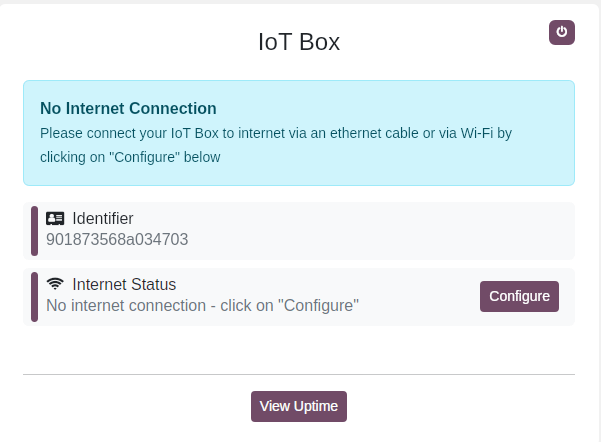
Wait a few minutes for the available networks to be scanned, select the network, enter the Wi-Fi's password, and click Connect.
Status dos LEDs
A caixa IoT possui dois LEDs, localizados à direita do slot do cartão SD, que mostram seu status e ajudam na resolução de problemas quando nenhuma tela está conectada. Os LEDs podem ser interpretados da seguinte forma:
Red LED lit: The IoT box has no Internet connection. Ensure the Ethernet cable is properly connected or connect the IoT box via Wi-Fi <iot/iot_box/network-wifi>.
Green LED flashing: The IoT box is awaiting connection to a database.
Green LED constantly lit: The IoT box is connected to a database; no further action is required.
Página inicial da IoT box
Para acessar a página inicial da IoT box, abra um navegador da web na mesma rede que a IoT box e navegue até o endereço IP da IoT box.
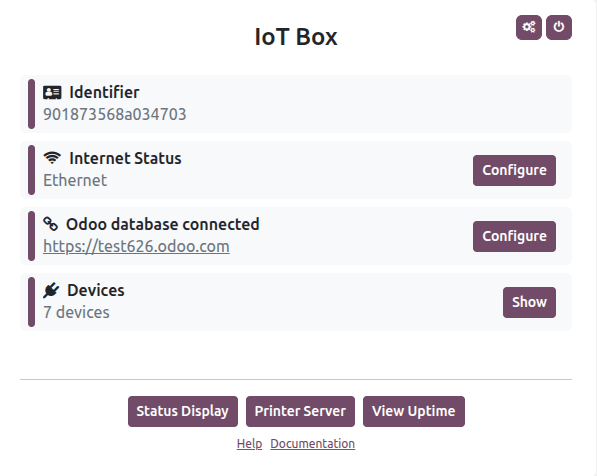
O endereço IP da IoT box pode ser recuperado por:
connecting the IoT box to an external monitor: the IP address is displayed on the screen.
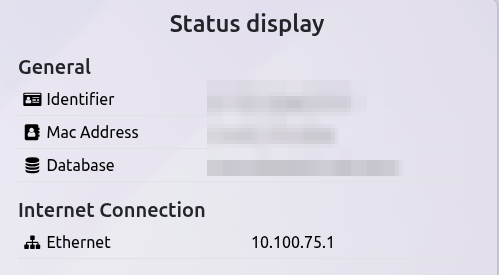
connecting the IoT box to a supported receipt or label printer with a USB cable: the IP address is automatically printed.
accessing the administrator interface of the router to which the IoT box is connected or using third-party software to scan the network.
Após a caixa IoT estar conectada ao banco de dados Odoo, sua página inicial pode ser acessada a partir do aplicativo IoT: clique no cartão relevante da caixa IoT e depois clique em Homepage.
Reinicialização da caixa IoT
Para reiniciar manualmente a caixa IoT, acesse sua página inicial <iot/iot-box/homepage>, depois clique no botão fa-power-off (desligar) no canto superior direito.