Tyro
Conectar um terminal de pagamento Tyro permite que você ofereça um fluxo de pagamento fluido aos seus clientes e facilite o trabalho de seus caixas.
Configuração
Emparelhe o terminal com seu sistema POS
Click the fa-bars (hamburger menu) icon and Payment settings on your terminal.
Enter your admin password.
Scroll down and click Pair with POS.
Click the fa-plus Pair with POS button.
Save the MID (Merchant ID) and TID (Terminal ID), which are now displayed on the screen.
Configurar a forma de pagamento
Install the POS Tyro module <general/install>.
-
Go to and click New.
Set the Journal as Bank
Select Terminal in the Integration field.
Select Tyro in the Integrate with field.
Fill in the Tyro Merchant ID and Tyro Terminal ID with the MID (Merchant ID) and TID (Terminal ID) displayed on the terminal.
To pair the payment method with the terminal, click the Pair Terminal button. This action sends a pairing request to the terminal, which takes a few seconds to complete.
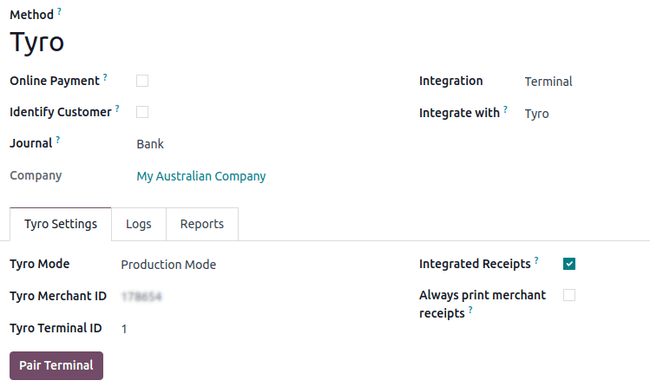
O campo Modo Tyro deve ser definido como Modo de Produção.
Adicione o método de pagamento a um POS
Para adicionar um método de pagamento ao seu ponto de venda:
Go to the POS settings <pos/use/settings>.
Select the POS in the Point of Sale field.
Add the payment method under the Payment Methods field of the Payment section.