Ingenico
A conexão de um terminal de pagamento permite oferecer um fluxo de pagamento fluido a seus clientes e facilitar o trabalho de seus caixas.
Configuração
Connect an IoT system
Connecting an Ingenico payment terminal to Odoo is a feature that requires an IoT system. For more information on how to connect an IoT system to your database, please refer to the IoT documentation.
Configure os terminais Lane/Desk/Move 5000 para Ingenico BENELUX
Press the function button (F on Lane/5000, ⦿ on Desk/5000 and Move/5000).
Go to and enter the settings password (default: 2009).
Select Change Connection and press OK on the next screen.
Select TCP/IP and IP-address.
On the next screen, enter the IP address of your IoT system.
Enter 9000 as port number and press OK on the next screen.
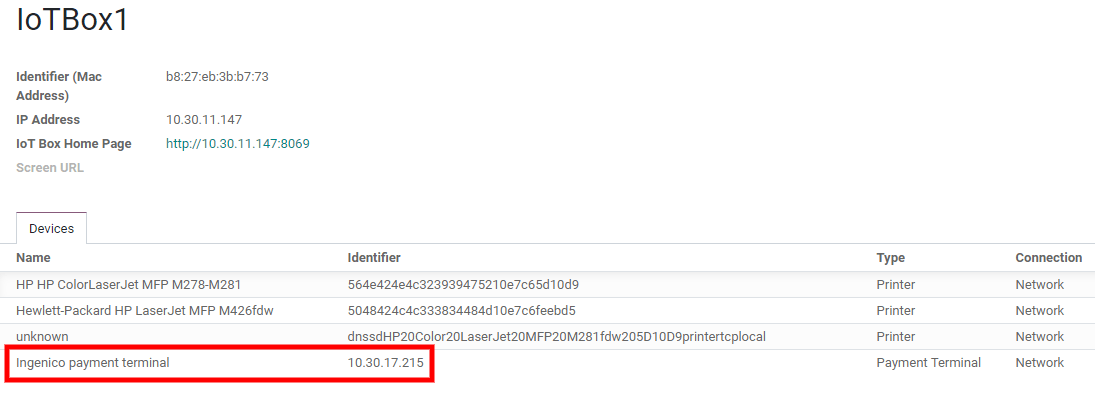
At this point, the terminal restarts and should be displayed on the IoT system's form in Odoo.
Configurar a forma de pagamento
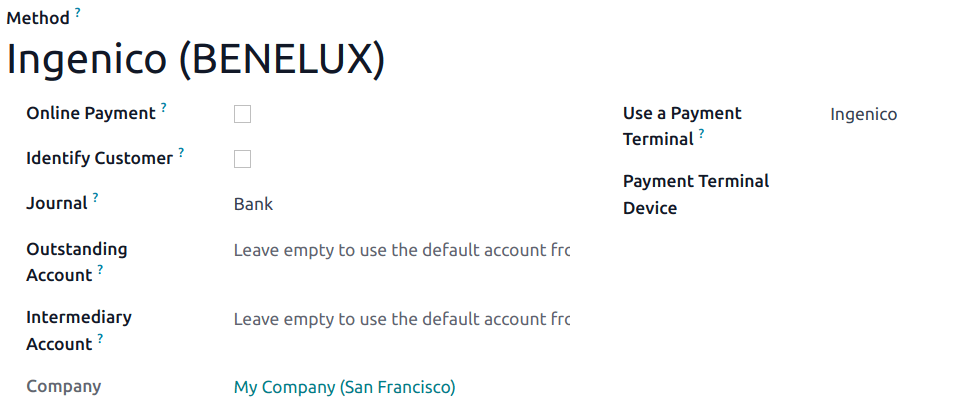
Ative o terminal de pagamento nas configurações da aplicação <pos/use/settings> e crie o método de pagamento relacionado. Defina o tipo de diário como Banco e selecione Ingenico no campo Usar um Terminal de Pagamento. Em seguida, selecione seu dispositivo terminal no campo Dispositivo Terminal de Pagamento.
Uma vez criado o método de pagamento, você pode selecioná-lo nas configurações do seu PDV. Para fazer isso, acesse as configurações do PDV <pos/use/settings>, clique em Editar e adicione o método de pagamento na seção Pagamentos.