ORM API
Modelos
Model fields are defined as attributes on the model itself:
from odoo import models, fields
class AModel(models.Model):
    _name = 'a.model.name'

    field1 = fields.Char()
By default, the field's label (user-visible name) is a capitalized version of the field name, this can be overridden with the string parameter.
field2 = fields.Integer(string="Field Label")
For the list of field types and parameters, see the fields reference <reference/fields>.
Default values are defined as parameters on fields, either as a value:
name = fields.Char(default="a value")
or as a function called to compute the default value, which should return that value:
def _default_name(self):
    return self.get_value()

name = fields.Char(default=lambda self: self._default_name())
API
AbstractModel
Modelo
TransientModel
Campos
Basic Fields
Advanced Fields
Date(time) Fields
Dates <odoo.fields.Date> and Datetimes <odoo.fields.Datetime> are very important fields in any kind of business application. Their misuse can create invisible yet painful bugs, this section aims to provide Odoo developers with the knowledge required to avoid misusing these fields.
When assigning a value to a Date/Datetime field, the following options are valid:
A date or datetime object.
A string in the proper server format:
YYYY-MM-DD for ~odoo.fields.Date fields,
YYYY-MM-DD HH:MM:SS for ~odoo.fields.Datetime fields.
False or None.
The Date and Datetime fields class have helper methods to attempt conversion into a compatible type:
~odoo.fields.Date.to_date will convert to a datetime.date
~odoo.fields.Datetime.to_datetime will convert to a datetime.datetime.
Date / Datetime comparison best practices:
Date fields can only be compared to date objects.
Datetime fields can only be compared to datetime objects.
Common operations with dates and datetimes such as addition, subtraction or fetching the start/end of a period are exposed through both ~odoo.fields.Date and ~odoo.fields.Datetime. These helpers are also available by importing odoo.tools.date_utils.
Relational Fields
Pseudo-relational fields
Computed Fields
Fields can be computed (instead of read straight from the database) using the compute parameter. It must assign the computed value to the field. If it uses the values of other fields, it should specify those fields using ~odoo.api.depends.
from odoo import api
total = fields.Float(compute='_compute_total')

@api.depends('value', 'tax')
def _compute_total(self):
    for record in self:
        record.total = record.value + record.value * record.tax
dependencies can be dotted paths when using sub-fields:
@api.depends('line_ids.value')
def _compute_total(self):
    for record in self:
        record.total = sum(line.value for line in record.line_ids)
computed fields are not stored by default, they are computed and returned when requested. Setting store=True will store them in the database and automatically enable searching and grouping. Note that by default, compute_sudo=True is set on the field.
searching on a computed field can also be enabled by setting the search parameter. The value is a method name returning a reference/orm/domains.
upper_name = field.Char(compute='_compute_upper', search='_search_upper')

def _search_upper(self, operator, value):
    if operator == 'like':
        operator = 'ilike'
    return Domain('name', operator, value)
computed fields are readonly by default. To allow setting values on a computed field, use the inverse parameter. It is the name of a function reversing the computation and setting the relevant fields:
document = fields.Char(compute='_get_document', inverse='_set_document')

def _get_document(self):
    for record in self:
        with open(record.get_document_path) as f:
            record.document = f.read()
def _set_document(self):
    for record in self:
        if not record.document: continue
        with open(record.get_document_path()) as f:
            f.write(record.document)
multiple fields can be computed at the same time by the same method, just use the same method on all fields and set all of them:
discount_value = fields.Float(compute='_apply_discount')
total = fields.Float(compute='_apply_discount')

@api.depends('value', 'discount')
def _apply_discount(self):
    for record in self:
        # compute actual discount from discount percentage
        discount = record.value * record.discount
        record.discount_value = discount
        record.total = record.value - discount
Automatic fields
Access Log fields
These fields are automatically set and updated if ~odoo.models.BaseModel._log_access is enabled. It can be disabled to avoid creating or updating those fields on tables for which they are not useful.
By default, ~odoo.models.BaseModel._log_access is set to the same value as ~odoo.models.BaseModel._auto
Reserved Field names
A few field names are reserved for pre-defined behaviors beyond that of automated fields. They should be defined on a model when the related behavior is desired:
Constraints and indexes
Similarly to fields, you can declare ~odoo.models.Constraint, ~odoo.models.Index and ~odoo.models.UniqueIndex. The name of the attribute must begin with _ to avoid name clashes with field names.
You can customize error messages. They can either be strings and their translation will be provided in the internal reflected constraint table. Otherwise, they can be functions that take (env, diag) as parameters which respectively denote the environment and psycopg diagnostics.
Recordsets
Interactions with models and records are performed through recordsets, an ordered collection of records of the same model.
Methods defined on a model are executed on a recordset, and their self is a recordset:
class AModel(models.Model):
    _name = 'a.model'
    def a_method(self):
        # self can be anything between 0 records and all records in the
        # database
        self.do_operation()
Iterating on a recordset will yield new sets of a single record ("singletons"), much like iterating on a Python string yields strings of a single characters:
def do_operation(self):
    print(self) # => a.model(1, 2, 3, 4, 5)
    for record in self:
        print(record) # => a.model(1), then a.model(2), then a.model(3), ...
Field access
Recordsets provide an "Active Record" interface: model fields can be read and written directly from the record as attributes.
Field values can also be accessed like dict items, which is more elegant and safer than getattr() for dynamic field names. Setting a field's value triggers an update to the database:
>>> record.name
Example Name
>>> record.company_id.name
Company Name
>>> record.name = "Bob"
>>> field = "name"
>>> record[field]
Bob
Accessing a relational field (~odoo.fields.Many2one, ~odoo.fields.One2many, ~odoo.fields.Many2many) always returns a recordset, empty if the field is not set.
Record cache and prefetching
Odoo maintains a cache for the fields of the records, so that not every field access issues a database request, which would be terrible for performance. The following example queries the database only for the first statement:
record.name             # first access reads value from database
record.name             # second access gets value from cache
To avoid reading one field on one record at a time, Odoo prefetches records and fields following some heuristics to get good performance. Once a field must be read on a given record, the ORM actually reads that field on a larger recordset, and stores the returned values in cache for later use. The prefetched recordset is usually the recordset from which the record comes by iteration. Moreover, all simple stored fields (boolean, integer, float, char, text, date, datetime, selection, many2one) are fetched altogether; they correspond to the columns of the model's table, and are fetched efficiently in the same query.
Consider the following example, where partners is a recordset of 1000 records. Without prefetching, the loop would make 2000 queries to the database. With prefetching, only one query is made:
for partner in partners:
    print partner.name          # first pass prefetches 'name' and 'lang'
                                # (and other fields) on all 'partners'
    print partner.lang
The prefetching also works on secondary records: when relational fields are read, their values (which are records) are subscribed for future prefetching. Accessing one of those secondary records prefetches all secondary records from the same model. This makes the following example generate only two queries, one for partners and one for countries:
countries = set()
for partner in partners:
    country = partner.country_id        # first pass prefetches all partners
    countries.add(country.name)         # first pass prefetches all countries
The methods ~odoo.models.Model.search_fetch and ~odoo.models.Model.fetch can be used to populate the cache of records, typically in cases where the prefetching mechanism does not work well.
Method decorators
Ambiente
>>> records.env
<Environment object ...>
>>> records.env.uid
3
>>> records.env.user
res.user(3)
>>> records.env.cr
<Cursor object ...>
When creating a recordset from an other recordset, the environment is inherited. The environment can be used to get an empty recordset in an other model, and query that model:
>>> self.env['res.partner']
res.partner()
>>> self.env['res.partner'].search([('is_company', '=', True), ('customer', '=', True)])
res.partner(7, 18, 12, 14, 17, 19, 8, 31, 26, 16, 13, 20, 30, 22, 29, 15, 23, 28, 74)
Some lazy properties are available to access the environment (contextual) data:
Useful environment methods
Altering the environment
SQL Execution
The ~odoo.api.Environment.cr attribute on environments is the cursor for the current database transaction and allows executing SQL directly, either for queries which are difficult to express using the ORM (e.g. complex joins) or for performance reasons:
self.env.cr.execute("some_sql", params)
The recommended way to build SQL queries is to use the wrapper object
One important thing to know about models is that they don't necessarily perform database updates right away. Indeed, for performance reasons, the framework delays the recomputation of fields after modifying records. And some database updates are delayed, too. Therefore, before querying the database, one has to make sure that it contains the relevant data for the query. This operation is called flushing and performs the expected database updates.
Before every SQL query, one has to flush the data needed for that query. There are three levels for flushing, each with its own API. One can flush either everything, all the records of a model, or some specific records. Because delaying updates improves performance in general, we recommend to be specific when flushing.
Because models use the same cursor and the ~odoo.api.Environment holds various caches, these caches must be invalidated when altering the database in raw SQL, or further uses of models may become incoherent. It is necessary to clear caches when using CREATE, UPDATE or DELETE in SQL, but not SELECT (which simply reads the database).
Just like flushing, one can invalidate either the whole cache, the cache of all the records of a model, or the cache of specific records. One can even invalidate specific fields on some records or all records of a model. As the cache improves performance in general, we recommend to be specific when invalidating.
The methods above keep the caches and the database consistent with each other. However, if computed field dependencies have been modified in the database, one has to inform the models for the computed fields to be recomputed. The only thing the framework needs to know is what fields have changed on which records.
One has to figure out which records have been modified. There are many ways to do this, possibly involving extra SQL queries. In the example above, we take advantage of the RETURNING clause of PostgreSQL to retrieve the information without an extra query. After making the cache consistent by invalidation, invoke the method modified on the modified records with the fields that have been updated.
Common ORM methods
Create/Update
Search/Read
Campos
Search domains
A search domain is a first-order logical predicate used for filtering and searching recordsets. You combine simple conditions on a field expression with logical operators.
~odoo.fields.Domain can be used as a builder for domains.
# simple condition domains
d1 = Domain('name', '=', 'abc')
d2 = Domain('phone', 'like', '7620')

# combine domains
d3 = d1 & d2  # and
d4 = d1 | d2  # or
d5 = ~d1      # not

# combine and parse multiple domains (any iterable of domains)
Domain.AND([d1, d2, d3, ...])
Domain.OR([d4, d5, ...])

# constants
Domain.TRUE   # true domain
Domain.FALSE  # false domain
A domain can be a simple condition (field_expr, operator, value) where:
- field_expr (str)
a field name of the current model, or a relationship traversal through a ~odoo.fields.Many2one using dot-notation e.g. 'street' or 'partner_id.country'. If the field is a date(time) field, you can also specify a part of the date using 'field_name.granularity'. The supported granularities are 'year_number', 'quarter_number', 'month_number', 'iso_week_number', 'day_of_week', 'day_of_month', 'day_of_year', 'hour_number', 'minute_number', 'second_number'. They all use an integer as value.
- operator (str)
an operator used to compare the field_expr with the value. Valid operators are:
- =
equals to
- !=
not equals to
- >
greater than
- >=
greater than or equal to
- <
less than
- <=
less than or equal to
- =?
unset or equals to (returns true if value is either None or False, otherwise behaves like =)
- =like (and not =like)
matches field_expr against the value pattern. An underscore _ in the pattern stands for (matches) any single character; a percent sign % matches any string of zero or more characters.
- like (and not like)
matches field_expr against the %value% pattern. Similar to =like but wraps value with '%' before matching
- ilike (and not ilike)
case insensitive like
- =ilike (and not =ilike)
case insensitive =like
- in (and not in)
is equal to any of the items from value, value should be a collection of items
- child_of
is a child (descendant) of a value record (value can be either one item or a list of items).
Takes the semantics of the model into account (i.e following the relationship field named by ~odoo.models.Model._parent_name).
- parent_of
is a parent (ascendant) of a value record (value can be either one item or a list of items).
Takes the semantics of the model into account (i.e following the relationship field named by ~odoo.models.Model._parent_name).
- any (and not any)
matches if any record in the relationship traversal through field_expr (~odoo.fields.Many2one, ~odoo.fields.One2many, or ~odoo.fields.Many2many) satisfies the provided domain value. The field_expr should be a field name.
- any! (and not any!)
like any, but bypasses access checks.
- value
variable type, must be comparable (through operator) to the named field.
~odoo.fields.Domain can be used to serialize the domain as a list of simple conditions represented by 3-item tuple (or a list). Such a serialized form may be sometimes faster to read or write. Domain conditions can be combined using logical operators in a prefix notation. You can combine 2 domains using '&' (AND), '|' (OR) and you can negate 1 using '!' (NOT).
# parse a domain (from list to Domain)
domain = Domain([('name', '=', 'abc'), ('phone', 'like', '7620')])

# serialize domain as a list (from Domain to list)
domain_list = list(domain)
# will output:
# ['&', ('name', '=', 'abc'), ('phone', 'like', '7620')]
Dynamic time values
In the context of search domains, for date and datetime fields <reference/fields/date>, the value can be a moment relative to now in the timezone of the user. A simple language is provided to specify these dates. It is a space-separated string of terms. The first term is optional and is "today" (at midnight) or "now". Then, each term starts with "+" (add), "-" (subtract) or "=" (set), followed by an integer and date unit or a lower-case weekday.
The date units are: "d" (days), "w" (weeks), "m" (months), "y" (years), "H" (hours), "M" (minutes), "S" (seconds). For weekdays, "+" and "-" mean next and previous weekday (unless we are already in that weekday) and "=" means in current week starting on Monday. When setting a date, the lower-units (hours, minutes and seconds) are set to 0.
Unlink
Record(set) information
Operações
Recordsets are immutable, but sets of the same model can be combined using various set operations, returning new recordsets.
record in set returns whether record (which must be a 1-element recordset) is present in set. record not in set is the inverse operation
set1 <= set2 and set1 < set2 return whether set1 is a subset of set2 (resp. strict)
set1 >= set2 and set1 > set2 return whether set1 is a superset of set2 (resp. strict)
set1 | set2 returns the union of the two recordsets, a new recordset containing all records present in either source
set1 & set2 returns the intersection of two recordsets, a new recordset containing only records present in both sources
set1 - set2 returns a new recordset containing only records of set1 which are not in set2
Recordsets are iterable so the usual Python tools are available for transformation (python:map, python:sorted, ~python:itertools.ifilter, ...) however these return either a python:list or an python:iterator, removing the ability to call methods on their result, or to use set operations.
Recordsets therefore provide the following operations returning recordsets themselves (when possible):
Filtro
Mapa ~~~
Sort
Grouping
Inheritance and extension
Odoo provides three different mechanisms to extend models in a modular way:
creating a new model from an existing one, adding new information to the copy but leaving the original module as-is
extending models defined in other modules in-place, replacing the previous version
delegating some of the model's fields to records it contains
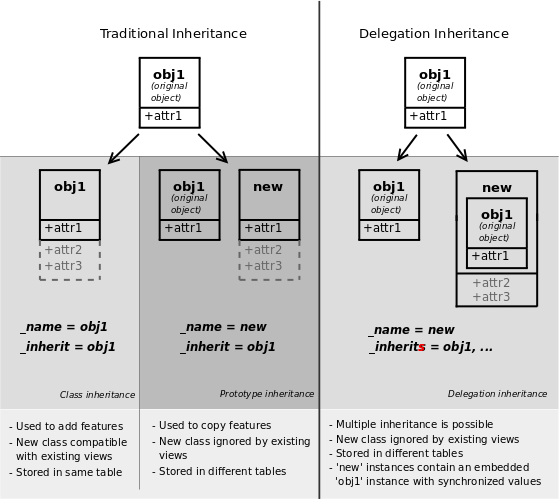
Classical inheritance
When using the ~odoo.models.Model._inherit and ~odoo.models.Model._name attributes together, Odoo creates a new model using the existing one (provided via ~odoo.models.Model._inherit) as a base. The new model gets all the fields, methods and meta-information (defaults & al) from its base.
class Inheritance0(models.Model):
    _name = 'inheritance.0'
    _description = 'Inheritance Zero'

    name = fields.Char()

    def call(self):
        return self.check("model 0")

    def check(self, s):
        return "This is {} record {}".format(s, self.name)

class Inheritance1(models.Model):
    _name = 'inheritance.1'
    _inherit = ['inheritance.0']
    _description = 'Inheritance One'

    def call(self):
        return self.check("model 1")
and using them:
a = env['inheritance.0'].create({'name': 'A'})
b = env['inheritance.1'].create({'name': 'B'})

a.call()
b.call()
will yield:
"This is model 0 record A" "This is model 1 record B"
the second model has inherited from the first model's check method and its name field, but overridden the call method, as when using standard Python inheritance <python:tut-inheritance>.
Extension
When using ~odoo.models.Model._inherit but leaving out ~odoo.models.Model._name, the new model replaces the existing one, essentially extending it in-place. This is useful to add new fields or methods to existing models (created in other modules), or to customize or reconfigure them (e.g. to change their default sort order)
class Extension0(models.Model):
    _name = 'extension.0'
    _description = 'Extension zero'

    name = fields.Char(default="A")

class Extension0(models.Model):
    _inherit = 'extension.0'

    description = fields.Char(default="Extended")
record = env['extension.0'].create({})
record.read()[0]will yield:
{'name': "A", 'description': "Extended"}
Delegation
The third inheritance mechanism provides more flexibility (it can be altered at runtime) but less power: using the ~odoo.models.Model._inherits a model delegates the lookup of any field not found on the current model to "children" models. The delegation is performed via ~odoo.fields.Reference fields automatically set up on the parent model.
The main difference is in the meaning. When using Delegation, the model has one instead of is one, turning the relationship in a composition instead of inheritance
class Screen(models.Model):
    _name = 'delegation.screen'
    _description = 'Screen'

    size = fields.Float(string='Screen Size in inches')

class Keyboard(models.Model):
    _name = 'delegation.keyboard'
    _description = 'Keyboard'

    layout = fields.Char(string='Layout')

class Laptop(models.Model):
    _name = 'delegation.laptop'
    _description = 'Laptop'

    _inherits = {
        'delegation.screen': 'screen_id',
        'delegation.keyboard': 'keyboard_id',
    }

    name = fields.Char(string='Name')
    maker = fields.Char(string='Maker')

    # a Laptop has a screen
    screen_id = fields.Many2one('delegation.screen', required=True, ondelete="cascade")
    # a Laptop has a keyboard
    keyboard_id = fields.Many2one('delegation.keyboard', required=True, ondelete="cascade")
record = env['delegation.laptop'].create({
'screen_id': env['delegation.screen'].create({'size': 13.0}).id,
'keyboard_id': env['delegation.keyboard'].create({'layout': 'QWERTY'}).id,
})
record.size
record.layoutwill result in:
13.0
'QWERTY'
and it's possible to write directly on the delegated field:
record.write({'size': 14.0})
Fields Incremental Definition
A field is defined as class attribute on a model class. If the model is extended, one can also extend the field definition by redefining a field with the same name and same type on the subclass. In that case, the attributes of the field are taken from the parent class and overridden by the ones given in subclasses.
For instance, the second class below only adds a tooltip on the field state
class FirstFoo(models.Model):
    state = fields.Selection([...], required=True)

class FirstFoo(models.Model):
    _inherit = ['first.foo']
    state = fields.Selection(help="Blah blah blah")

class WrongFirstFooClassName(models.Model):
    _name = 'first.foo'  # force the model name
    _inherit = ['first.foo']
    state = fields.Selection(help="Blah blah blah")