External JSON-2 API
Odoo is usually extended internally via modules, but many of its features and all of its data are also available externally for analysis or integration with various other softwares. Part of the reference/orm/model API is easily available over HTTP via the /json/2 endpoint.
API
Request
Post a JSON object at the /json/2/<model>/<method> URL.
HTTP Headers
- Host:
Required, the hostname of the server.
- Autorization:
Required, bearer followed by an API key <reference/external_api/api_key>.
- Content-Type:
Required, application/json, a charset is recommended.
- X-Odoo-Database:
Optional, the name of the database to connect to.
- User-Agent:
Recommended, the name of your software.
URL Path
- model:
Required, the technical model name.
- method:
Required, the method to execute.
Body JSON object
- ids:
An array of record ids on which to execute the method. Empty or omitted when calling an @api.model-decorated method.
- context:
Optional, an object of additional values. e.g. {"lang": "en_US"}.
- param:
As many time as needed, the method's parameters.
Response
In case of success, a 200 status with the JSON-serialized return value of the called method in the body.
In case of error, a 4xx/5xx status with a JSON-serialized error object in the body.
- name:
The fully qualified name of the Python exception that occured.
- message:
The exception message, usually the same as arguments[0].
- arguments:
All the exception arguments.
- context:
The context used by the request.
- debug:
The exception traceback, for debugging purpose.
Configuração
API Keys
Manual Key Generation
An API key must be set in the Authorization request header, as a bearer token.
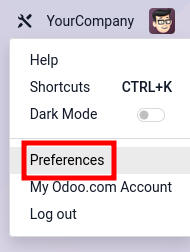
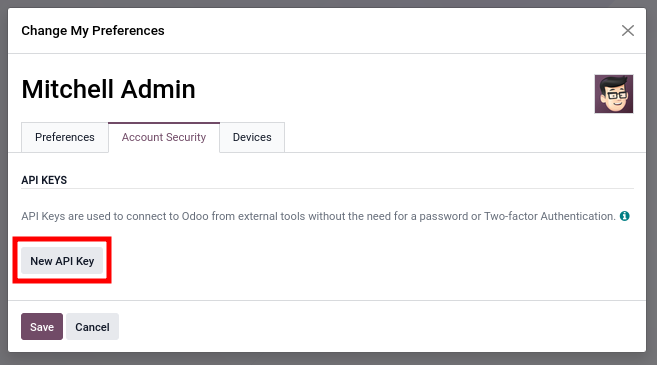
Create a new API key for a user via .
|
|
|
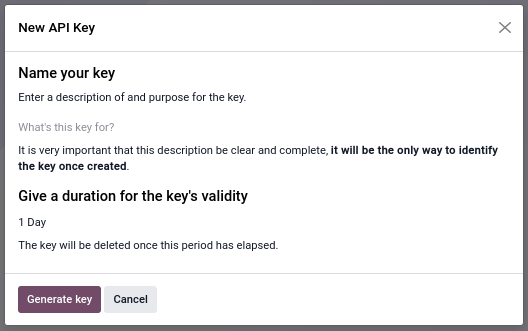
Both a description and a duration are needed to create a new API key. The description makes it possible to identify the key, and to determine later whether the key is still in use or should be removed. The duration determines the lifetime of the key, after which the key becomes invalid. It is recommended to set a short duration (typically one day) for interactive usage. For security reasons, it is not possible to create keys that last for more than three months. This means that long lasting keys must be rotated at least once every three months.
The Generate Key button creates a strong 160-bits random key. The key value is displayed only once during creation and cannot be retrieved later. Copy the key immediately and store it securely. If the key is compromised or lost, delete it immediately and generate a new one.
Please refer to OWASP's Secrets Management Cheat Sheet for further guidance on the management of API keys.
Programmatic Key Management
Odoo provides RPC methods to generate and revoke API keys programmatically.
Pré-requisitos
By default, programmatic API key management is restricted to users with the Settings administration access right.
To allow other users to manage API keys programmatically, navigate to and set the parameter base.enable_programmatic_api_keys to True.
Key Generation
API keys can be generated with res.users.apikeys.generate.
The method accepts the following parameters:
key (string): an existing valid API key
scope (string or null): the scope assigned to the new key
name (string): a human-readable label
expiration_date (string): the expiration date formatted as ISO 8601 (e.g. "2026-05-19")
A scope restricts where an API key can be used.
The rpc scope is the generic scope used for RPC access through controllers with auth='bearer'.
The new key should generally use the same scope as the existing key. However, it is possible to create a scoped key from an unscoped key when needed. Unscoped keys use null as their scope value (None in Python).
The expiration date is validated against the maximum API key duration allowed by the roles assigned to the user.
Use shorter expiration periods for high-privilege or externally exposed integrations, and longer periods only for tightly controlled internal systems.
The method returns the newly generated API key as a string that cannot be retrieved otherwise.
By default, a user can generate up to 10 API keys programmatically. This limit can be configured with the system parameter base.programmatic_api_keys_limit.
Attempting to exceed the configured limit fails with an HTTP 422 Unprocessable Content status code.
Key Revocation
API keys can be revoked with res.users.apikeys.revoke.
The method accepts the following parameter:
key (string): the API key to revoke
If the key is valid, it is revoked immediately and becomes unusable for subsequent requests. Otherwise, the request fails with an HTTP 403 Forbidden status code.
Note that the key being revoked and the one given in the Authorization header don't need to match. A good practice during rotation is to authenticate with the new key to revoke the old key.
Key Rotation Best Practices
Rotating API keys regularly reduces the risk of unauthorized access if a key is compromised.
When rotating API keys:
Generate a new key before revoking the previous one.
Store the new key securely before deployment.
Verify that all services are using the new key.
Revoke the previous key only after the transition is complete.
Use expiration dates appropriate for the security requirements of the system.
Prefer dedicated API keys per service or integration to simplify auditing and revocation.
Access Rights
The JSON-2 API uses the standard security models of Odoo <reference/security>. All operations are validated against the access rights, record rules and field accesses of the user.
For interactive usage, such as discovering the API or running one-time scripts, it is fine to use a personal account.
For extended automated usage, such as an integration with another software, it is recommended to create and use dedicated bot users. Using dedicated bot users has several benefits:
The minimum required permissions can be granted to the bot, limiting the impact if the API key gets compromised.
The password can be set empty to disable login/password authentication, limiting the likelihood of the account getting compromised.
The reference/fields/automatic/log_access use the bot account. No user is impersonalized.
Base de dados
Depending on the deployment, the Host and/or X-Odoo-Database request headers might be required. The Host header is required by HTTP/1.1 and is needed on servers where Odoo is installed next to other web applications, so that a web-server/reverse-proxy is able to route the request to the Odoo server. The X-Odoo-Database header is required when a single Odoo server hosts multiple databases and the dbfilter wasn't configured to use the Host header.
Most HTTP client libraries automatically set the Host header using the connection URL.
Transaction
All calls to the JSON-2 endpoint run in their own SQL transaction. The transaction is committed in case of success and is discarded in case of error. Using the JSON-2 API, it is not possible to chain multiple calls inside a single transaction. It means that one must be cautious when making multiple consecutive calls, as the database might be modified by other concurrent transactions. This is especially dangerous when performing operations related to reservations, payments, and such.
The solution is to always call a single method that performs all the related operations in a single transaction. This way, the data is guaranteed to stay consistent: either everything is done (success, commit), or nothing is done (error, rollback).
In the ORM, the search_read method is an example of a single method that performs multiple operations (search then read) in a single transaction. If a concurrent request removes one of the records search retrieves, then there is a risk that subsequent calls to read fail for a missing record error. Such a problem cannot occur in search_read, as the system guarantees proper isolation between transactions.
In business models, those methods are often prefixed by action_, such as sale.order's action_confirm method, which verifies that a sales order is valid before confirming it.
When no method exists for a set of related operations, a new one can be created in a dedicated module.
PostgreSQL - Transaction Isolation - Repeatable Read
Code Example
The following examples showcase how to execute two of the common ORM methods <reference/orm/models/crud> on a dummy database mycompany hosted on the dummy website https://mycompany.example.com. Its dynamic documentation <reference/external_api/dynamic_doc> would be available at https://mycompany.example.com/doc.
The above example is equivalent to running:
Model = self.env["res.partner"].with_context({"lang": "en_US"})
records = Model.search([("name", "ilike", "%deco%"), ("is_company", "=", True)])
return json.dumps(records.ids)
Then, in a new transaction:
records = self.env["res.partner"].with_context({"lang": "en_US"}).browse(ids)
names = records.read(["name"])
return json.dumps(names)
Dynamic Documentation
Under construction
Migrating from XML-RPC / JSON-RPC
Both the XML-RPC and JSON-RPC APIs at endpoints /xmlrpc, /xmlrpc/2 and /jsonrpc are scheduled for removal in Odoo 22 (fall 2028). Both RPC APIs expose the three same services: common, db (database) and object. All three services are deprecated.
Common service
The common service defines 3 functions:
version()
login(db, login, password)
authenticate(db, login, password, user_agent_env)
The version function is replaced by the /web/version endpoint.
GET /web/version HTTP/1.1HTTP/1.1 200 OK
Content-Type: application/json
{"version_info": [19, 0, 0, "final", 0, ""], "version": "19.0"}The two login and authenticate functions return the user ID corresponding to the user after a successful login. The user ID and password are necessary for subsequent RPC calls to the object service. The JSON-2 API uses a different authentication scheme where neither the user ID nor the password are used. It is still possible to retrieve the user's own ID by sending a JSON-2 request to res.users/context_get with no ID (the current user is extracted from the API key).
Database service
db_manager_security
The db service defines 13 functions:
create_database(master_pwd, db_name, demo, lang, user_password, login, country_code, phone)
duplicate_database(master_pwd, db_original_name, db_name, neutralize_database)
drop(master_pwd, db_name)
dump(master_pwd, db_name, format)
restore(master_pwd, db_name, data, copy)
change_admin_password(master_pwd, new_password)
rename(master_pwd, old_name, new_name)
migrate_databases(master_pwd, databases)
db_exist(db_name)
list()
list_lang()
list_countries(master_pwd)
server_version()
Many of those function are accessible via the /web/database controllers. Those controllers work hand-in-hand with the HTML form at /web/database/manager and are accessible via HTTP.
The following controllers use the verb POST and content-type application/x-www-form-urlencoded.
/web/database/create takes inputs master_pwd, name, login, password, demo, lang, and phone.
/web/database/duplicate takes inputs master_pwd, name, new_name, and neutralize_database (not neutralized by default).
/web/database/drop takes inputs master_pwd and name.
/web/database/backup takes inputs master_pwd, name, and backup_format (zip by default), and returns the backup in the http response.
/web/database/change_password takes inputs master_pwd and master_pwd_new.
The following controller uses the verb POST and content-type multipart/form-data.
/web/database/restore takes inputs master_pwd, name, copy (not copied by default) and neutralize (not neutralized by default), it takes a file input backup_file.
The following controller uses the verb POST and content-type application/json-rpc.
/web/database/list takes an empty JSON object as input, and returns the database list under the JSON response's result entry.
The remaining function are: server_version, which exists under /web/version, list_lang, and list_countries, which exist via JSON-2 on the res.lang and res.country models, and migrate_databases, which as non-programmable API at the moment.
Object service
The object service defines 2 functions:
execute(db, uid, passwd, model, method, *args)
execute_kw(db, uid, passwd, model, method, args, kw={})
They both give for access to all public model methods, including the generic ORM ones.
Both functions are stateless. It means that the database, user ID and user password are to be provided for each call. The model, method and arguments must be provided, too. The execute function takes as many extra positional arguments as necessary. The execute_kw function takes an args list of positional arguments and an optional kw dict of keyword arguments.
The records IDs are extracted from the first args. When the called method is decorated with @api.model, no record ID is extracted, and args is left as-is. It is only possible to give a context with execute_kw, as it is extracted from the keyword argument named context.
The JSON-2 API replaces the object service with a few differences. The database must only be provided (via the X-Odoo-Database HTTP header) on systems where there are multiple databases available for a same domain. The login/password authentication scheme is replaced by an API key (via the Authorization: bearer HTTP header). The model and method are placed in the URL. The request body is a JSON object with all the methods arguments, plus ids and context. All the arguments are named; there is no way in JSON-2 to call a function with positional arguments.